Salon queue management solves the fundamental tension every hair salon faces: walk-in clients generate significant revenue, but without a system to manage them, they create chaos that frustrates both clients and stylists. The solution is a virtual queue that lets walk-ins join a digital waitlist, see estimated wait times, and get notified when a stylist is ready — all without crowding your reception area.
In ScanQueue's own data from 879 walk-in visits at 18 barbershops in May 2026, 12% of walk-ins cancelled, usually because the wait was too long. That's a significant chunk of revenue walking out the door.
This guide covers how hair salons can manage walk-ins professionally, balance them with scheduled appointments, and turn waiting clients into loyal regulars.
Why Walk-In Management Is Different for Salons
Hair salons have unique characteristics that make queue management more nuanced than other industries.
Variable Service Times
A quick trim takes 20 minutes. A full color and cut takes 2.5 hours. A blowout takes 45 minutes. This variability makes predicting wait times challenging — a client walking in might wait 10 minutes or 90 minutes depending on which service the current client is receiving.
A good queue system accounts for this by factoring in the service type of current clients when calculating estimated wait times.
Stylist Preferences
Unlike a coffee shop where any barista can make your latte, salon clients often have stylist preferences. A walk-in might be willing to wait 40 minutes for their preferred stylist rather than see someone available now. Queue management needs to accommodate both "next available" and "specific stylist" preferences.
The Appointment-Walk-In Balance
Most salons run a hybrid model: some clients book appointments, others walk in. The challenge is honoring appointment times while fitting walk-ins into natural gaps. Without a system, this balance falls entirely on the receptionist's memory and judgment — a recipe for double-bookings and frustrated clients.
How does a virtual waiting room work for a salon?
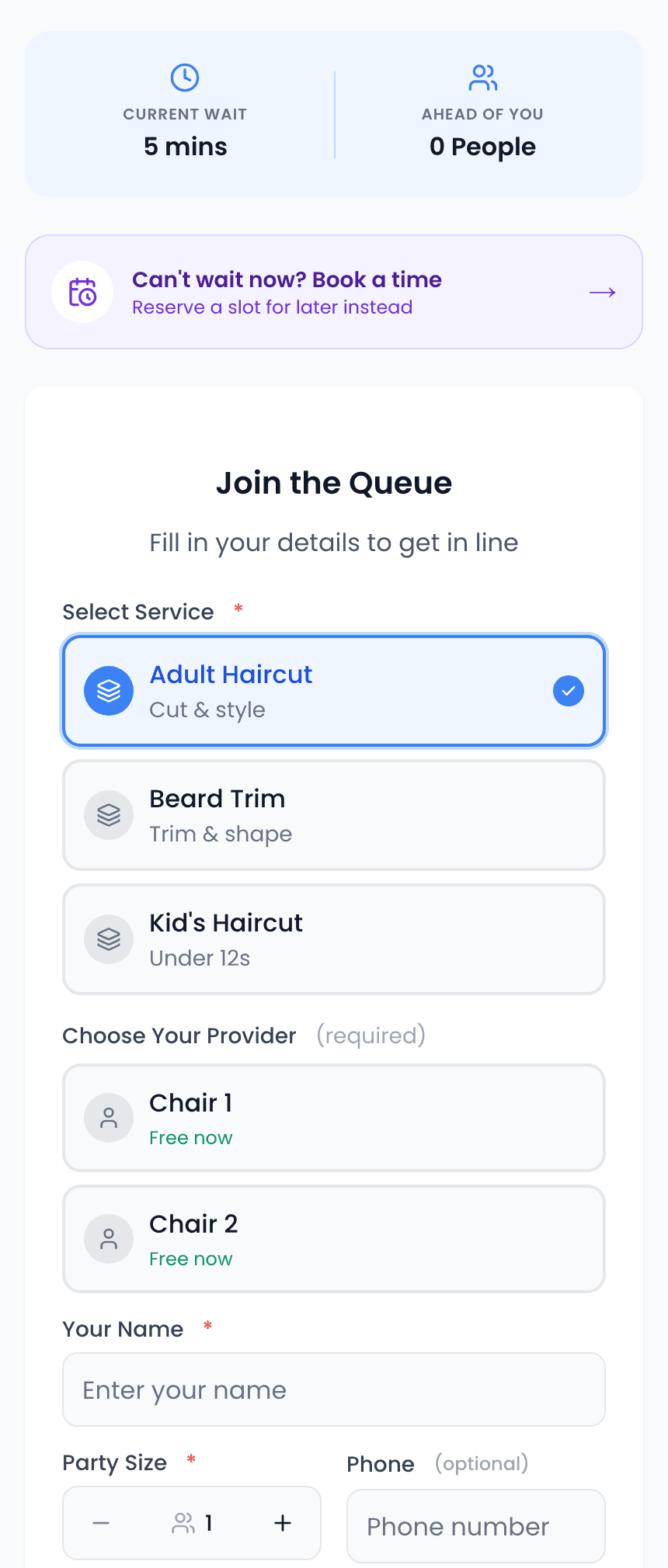
Walk-in clients scan a QR code at the door, choose their service and preferred stylist, and see their place in the queue and estimated wait on their phone. They can leave and get an SMS when their stylist is ready, which lets you fill the stylist time you keep open for walk-ins without a crowded reception. ScanQueue, for example, runs this flow with no app download for clients and no hardware for the salon.
Step by step, the flow for a salon using a virtual queue system looks like this:
- Walk-in arrives. They scan a QR code at the reception desk or salon entrance.
- Select their service. The check-in form shows available service categories (cut, color, blowout, etc.). They can also specify a stylist preference.
- Join the queue. They see their position, the estimated wait time, and can track progress on their phone.
- Wait comfortably. Instead of sitting in the salon watching the clock, they can grab coffee next door, run an errand, or browse nearby shops.
- Get notified. When a stylist is ready, they receive an SMS: "Hi Sarah! Your stylist is ready for you at [Salon Name]. Please head over within 5 minutes."
Practical Strategies for Salon Queue Management
1. Service-Based Queues
Set up separate queues for different service types. A client wanting a quick fringe trim shouldn't wait behind someone getting a full balayage. Service-based queues let you route walk-ins to the right stylists and give more accurate wait times.
Pro Tip — Express Lane: Create a dedicated "express" queue for services under 30 minutes (trims, blowouts, bang trims). This captures time-sensitive walk-ins who would otherwise leave and ensures quick-service slots don't go empty between longer appointments.
2. Stylist Availability Board
Display real-time stylist availability on a screen in your reception area or through your queue check-in page. Walk-ins can see which stylists are available soonest and make an informed decision about whether to wait or come back later.
3. Buffer Slots for Walk-Ins
Don't book stylists at 100% capacity with appointments. Leave 2-3 buffer slots per stylist per day specifically for walk-ins. This ensures you can always accommodate spontaneous clients without disrupting your appointment schedule.
4. Smart Waitlist Communication
Transparency reduces walk-aways. When a client joins your queue, they should immediately see:
- Their position in the queue
- Estimated wait time (factoring in service types ahead of them)
- Which stylist they'll see (if they specified a preference)
- Option to cancel if the wait is too long
This transparency is exactly what QR code queue systems provide — real-time updates directly on the client's phone.
5. Convert Walk-Ins to Future Appointments
Every walk-in interaction is an opportunity to book a future appointment. After a walk-in client is served, have the system send a follow-up SMS with a booking link. Clients who had a positive walk-in experience are highly receptive to booking their next visit.
Reception Area Best Practices
Even with a virtual queue, your reception area matters. Here's how to optimize it:
- Visible QR code placement. Display the QR code at eye level near the entrance and at the reception desk. Include a short instruction: "Scan to join our waitlist."
- Comfortable but limited seating. Keep 3-4 comfortable chairs for clients who prefer to wait on-site, but the virtual queue means you don't need seating for 10+.
- Retail display near check-in. Position product displays near the QR code. Clients scanning the code naturally notice retail products, driving add-on sales.
- Digital display showing queue status. A mounted screen showing current queue position and estimated times adds transparency and a modern feel.
ScanQueue: a virtual waiting room built for walk-ins
ScanQueue is the virtual queue described above. Clients scan your QR code, choose a service, and track their place and estimated wait on their phone, then get an SMS or WhatsApp message when it is their turn.
- Walk-ins and bookings together: booked clients and walk-ins sit in one list, with a separate queue per service so a trim is not stuck behind a colour.
- No hardware: staff run the queue from any phone, tablet or laptop, and a TV display can show who is next in reception.
- Free to start: the Starter plan is free for up to 10 clients a day.
Frequently Asked Questions
How do I handle clients who want a specific stylist?
Include a stylist preference field in your queue check-in form. The system routes the client to that stylist's queue specifically, even if other stylists are available sooner.
What if a walk-in doesn't return when notified?
Set a 5-minute return window in your SMS notification. If the client doesn't arrive, they're moved to a "passed" state and the next client is called. Most systems allow passed clients to rejoin the queue.
Should I charge walk-ins more than appointment clients?
Generally no — this creates resentment. Instead, use the queue system's data to staff appropriately for walk-in demand so you're capturing that revenue without premium pricing.
Can a queue system replace my booking software?
Queue systems handle walk-ins; booking software handles appointments. They're complementary. Some salons use a queue system alongside their existing booking tool to manage both channels from one dashboard.
Manage Walk-Ins Without the Chaos
ScanQueue gives your salon a professional virtual waitlist with QR code check-in, service-based queues, and SMS notifications — set up in minutes.
Explore Salon Solutions →Last updated: January 2026
Stop losing walk-ins to wait times
Set up ScanQueue in 5 minutes. Customers scan a QR code, get SMS alerts when it's their turn, and wait anywhere.
- Free plan — no credit card
- No app download for customers
- QR code, SMS, and WhatsApp notifications
ScanQueue Team
Queue Management Experts
Helping businesses reduce wait times and improve customer experience with smart queue management solutions.