Why Small Businesses Need Queue Management
If you run a small business where customers wait—a café, barbershop, medical clinic, retail store, or service centre—you've likely experienced the chaos of a busy period. Customers crowding your entrance, staff juggling check-ins with service delivery, and the sinking feeling of watching frustrated people walk away.
You might think queue management systems are only for big chains with deep pockets. That's yesterday's reality.
In 2026, virtual queue management is not only accessible to small businesses—it's often more valuable for them. Unlike enterprise operations with dedicated reception staff and sophisticated processes, small businesses typically have limited resources. A smart queue system can be the difference between surviving and thriving.
What is Virtual Queue Management?
Definition and How It Works
Virtual queue management is a system that allows customers to join your waitlist remotely and receive notifications when it's their turn—without physically standing in line.
The basic flow:
- Customer joins: Via QR code scan, website link, or staff assistance
- System confirms: Customer receives confirmation with queue position and estimated wait time
- Customer waits: Anywhere they choose—their car, nearby shops, a café down the street
- System notifies: SMS message alerts customer when their turn is approaching
- Customer returns: Ready to be served immediately
How It Differs from Traditional Methods
| Aspect | Traditional Queue | Virtual Queue |
|---|---|---|
| Customer location | Must stay near entrance | Can wait anywhere |
| How they join | Tell staff, write name | Self-service via phone |
| How they're notified | Name called, pager buzzes | SMS to their phone |
| Wait experience | Standing, watching, anxious | Free, productive, relaxed |
| Staff involvement | High (constant management) | Low (automated) |
| Data captured | Minimal or none | Name, phone, party size, timestamps |
Benefits for Small Businesses
1. Dramatically Improved Customer Experience
How virtual queuing improves experience:
- Eliminates the "standing around" frustration
- Gives customers control
- Shows you value their time
2. Significantly Reduced Walk-Aways
Virtual queuing helps reduce walk-aways by:
- Providing accurate wait estimates
- Allowing comfortable waiting
- Enabling queue position visibility
- Sending SMS notifications
3. Massive Staff Efficiency Gains
Less time spent managing the line
That's time your staff can spend on actual service delivery.
4. Valuable Data Insights
| Data Point | Business Value |
|---|---|
| Average wait times | Track improvements, set expectations |
| Peak hours/days | Optimise staffing schedules |
| Party sizes | Better preparation and allocation |
| No-show rates | Identify and address problems |
5. Professional Image
Virtual queuing projects professionalism with a clean, organised entrance area and modern, tech-savvy business image.
Choosing the Right System for Your Small Business
Must-Have Features
- QR Code Check-In — No app downloads required
- SMS Notifications — Must work reliably
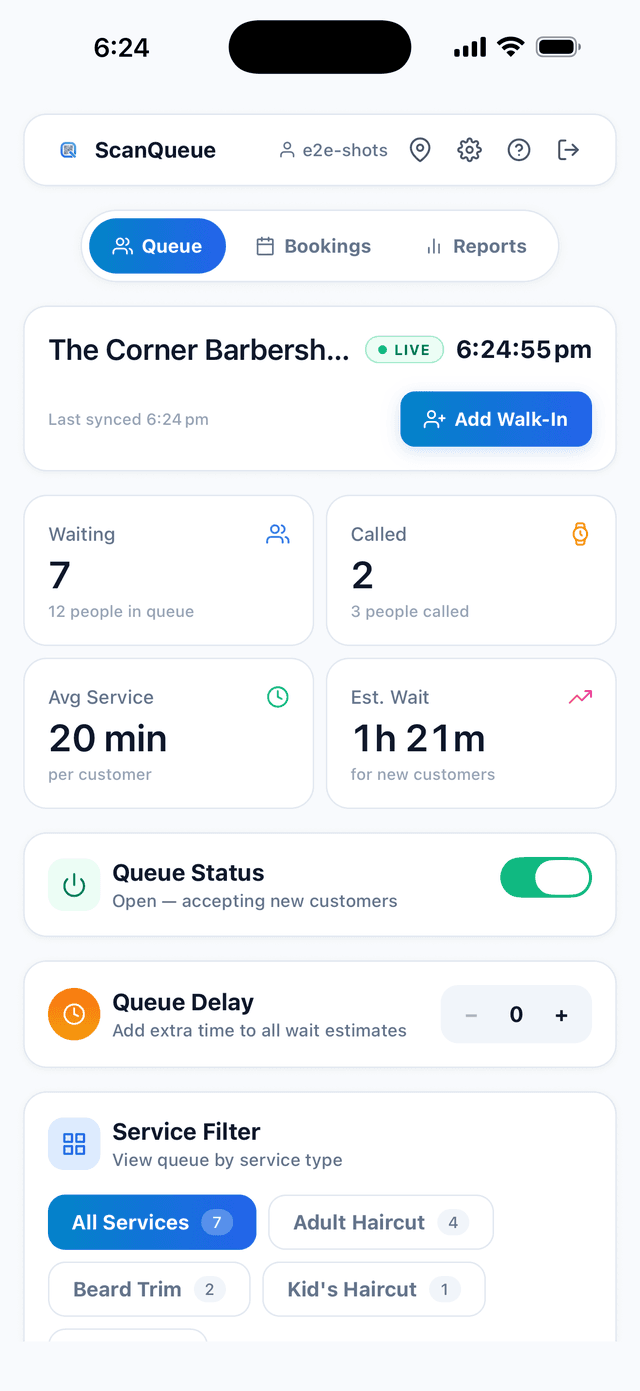
- Simple Staff Dashboard — Your team shouldn't need training
- Real-Time Queue Visibility — See who's waiting at a glance
- Basic Reporting — Average wait times, peak periods
Nice-to-Have Features
- Two-Way SMS — Customers can reply DELAY or CANCEL
- Wait Time Estimates — Automatic calculation
- Customer Position Updates — Keeps customers engaged
- Custom Branding — Your logo and colours
Budget Considerations
Compare to system costs:
- Free tiers: $0/month (limited features)
- Basic paid plans: $40-100/month
- Full-featured plans: $100-250/month
Top Affordable Solutions for Small Businesses
Free Options
1. ScanQueue Starter (Best Free Option)
- Up to 100 queue joins/month
- QR code check-in
- Limited SMS
- Best for: Small cafés, testing
2. Waitwhile Free
- Up to 50 visits/month
- Basic features
- Waitwhile branded
Under $100/Month Options
1. ScanQueue Growth — $99/month USD (Best Value)
- Up to 2,000 queue joins/month
- 500 SMS included
- Two-way SMS
- Responsive support
- Best for: Busy cafés, barbershops, restaurants
2. Waitwhile Starter — from $31/month USD
- Price scales with locations and monthly visits (up to 2,500 visits)
- SMS bought separately as prepaid credits
- Zapier integrations
- US timezone support
3. WaitWell Starter — from $29/month USD per location
- Very simple interface
- Basic SMS included
- Best for: Simplicity seekers
4. NextMe Starter — $49.99 USD/month billed annually
- Appointment + walk-in hybrid
- Best for: Barbershops, salons
Step-by-Step Implementation Guide
Phase 1: Preparation (Days 1-3)
- Day 1: Sign up and explore
- Day 2: Configure settings, SMS templates, branding
- Day 3: Print QR codes, create signage, prepare staff briefing
Phase 2: Staff Training (Days 4-5)
30-60 minute training session covering:
- Dashboard overview
- Core tasks (add, notify, remove customers)
- Customer assistance
- Practice scenarios
Phase 3: Soft Launch (Days 6-10)
- Introduce QR check-in alongside existing method
- Make it the primary method after Day 7
- Monitor and address issues daily
Phase 4: Full Launch (Week 2+)
- QR check-in is now the standard
- Target 70%+ customer adoption in first month
- Review analytics weekly
Common Mistakes to Avoid
Mistake 1: Poor Signage
Fix: Make QR codes large (10cm+), at eye level, with clear instructions
Mistake 2: Inadequate Staff Buy-In
Fix: Involve staff early, explain benefits, provide training
Mistake 3: Inaccurate Wait Time Estimates
Fix: Start conservative, adjust based on actual data
Mistake 4: Ignoring Non-Smartphone Customers
Fix: Always have manual add option ready
Mistake 5: Set-and-Forget Mentality
Fix: Schedule weekly analytics reviews, continuously optimise
Success Metrics to Track
Primary Metrics (Track Weekly)
- Customer Adoption Rate — Target: 70%+ first month
- Average Wait Time — Target: 15-30% reduction
- Walk-Away Rate — Target: 40-60% reduction
- No-Show Rate — Target: Under 10%
Secondary Metrics (Track Monthly)
- Staff time on queue management
- Customer satisfaction feedback
- Peak time patterns
Conclusion: Small Business, Big Opportunity
Virtual queue management isn't just for enterprise corporations. In 2026, it's one of the most accessible and impactful technologies available to small businesses.
For under $100/month—less than a single shift's wages—you can:
- Transform customer experience from frustrating to seamless
- Reduce walk-aways, directly boosting revenue
- Free staff from administrative queue tasks
- Gain insights into your business you've never had before
- Project professionalism that builds your brand
The small businesses thriving in 2026 are those that respect their customers' time.
See How ScanQueue Works for Retail
Discover how retail stores are using ScanQueue to manage walk-ins, reduce wait times, and keep customers coming back.
View Retail Solutions →Take the First Step Today
Start Your Free ScanQueue Trial →✓ Free tier available (no credit card required)
✓ Set up in under 10 minutes
✓ Responsive support team
✓ Upgrade when you're ready
Last updated: January 2026
Stop losing walk-ins to wait times
Set up ScanQueue in 5 minutes. Customers scan a QR code, get SMS alerts when it's their turn, and wait anywhere.
- Free plan, no credit card
- No app download for customers
- QR code, SMS, and WhatsApp notifications
Fernando Mendes
Founder, ScanQueue
Helping businesses reduce wait times and improve customer experience with smart queue management solutions.