Virtual queues work best for walk-in-heavy, variable-demand businesses. Appointment booking works best for time-sensitive, capacity-limited services. Many businesses benefit from using both. The right choice depends on your customer behavior, service model, and operational constraints.
This guide breaks down the strengths, weaknesses, and ideal use cases for both approaches. By the end, you will have a clear framework for deciding which model fits your business, or whether a hybrid approach is the answer.
How Virtual Queues Work
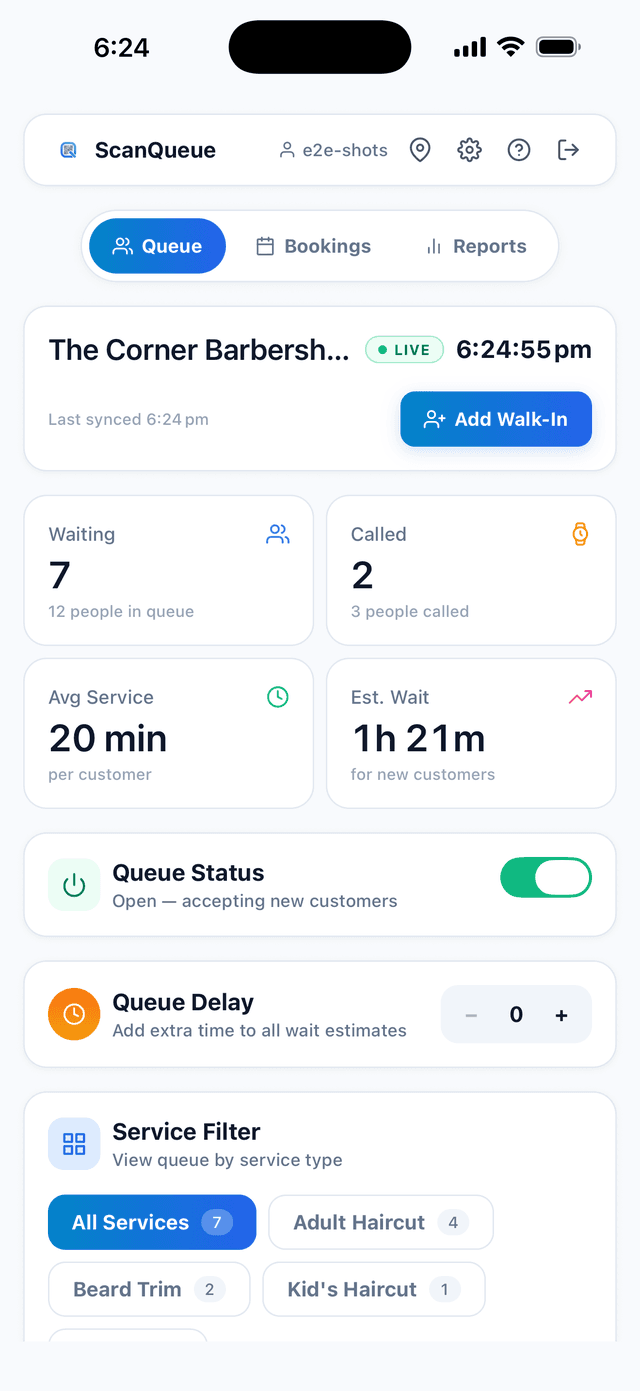
A virtual queue replaces the physical line with a digital one. Customers join remotely, usually by scanning a QR code, sending a text, or checking in on a website. They receive their position in the queue and real-time updates via SMS. When their turn approaches, they are notified to return or present themselves.
Key characteristics of virtual queues:
- First-come, first-served. Customers are served in the order they join, creating a fair and transparent system.
- No advance planning required. Customers can join on arrival without scheduling ahead of time.
- Flexible capacity. The queue expands and contracts naturally with demand. There are no wasted time slots.
- Real-time transparency. Customers see their position and estimated wait time, which reduces anxiety and complaints.
How Appointment Booking Works
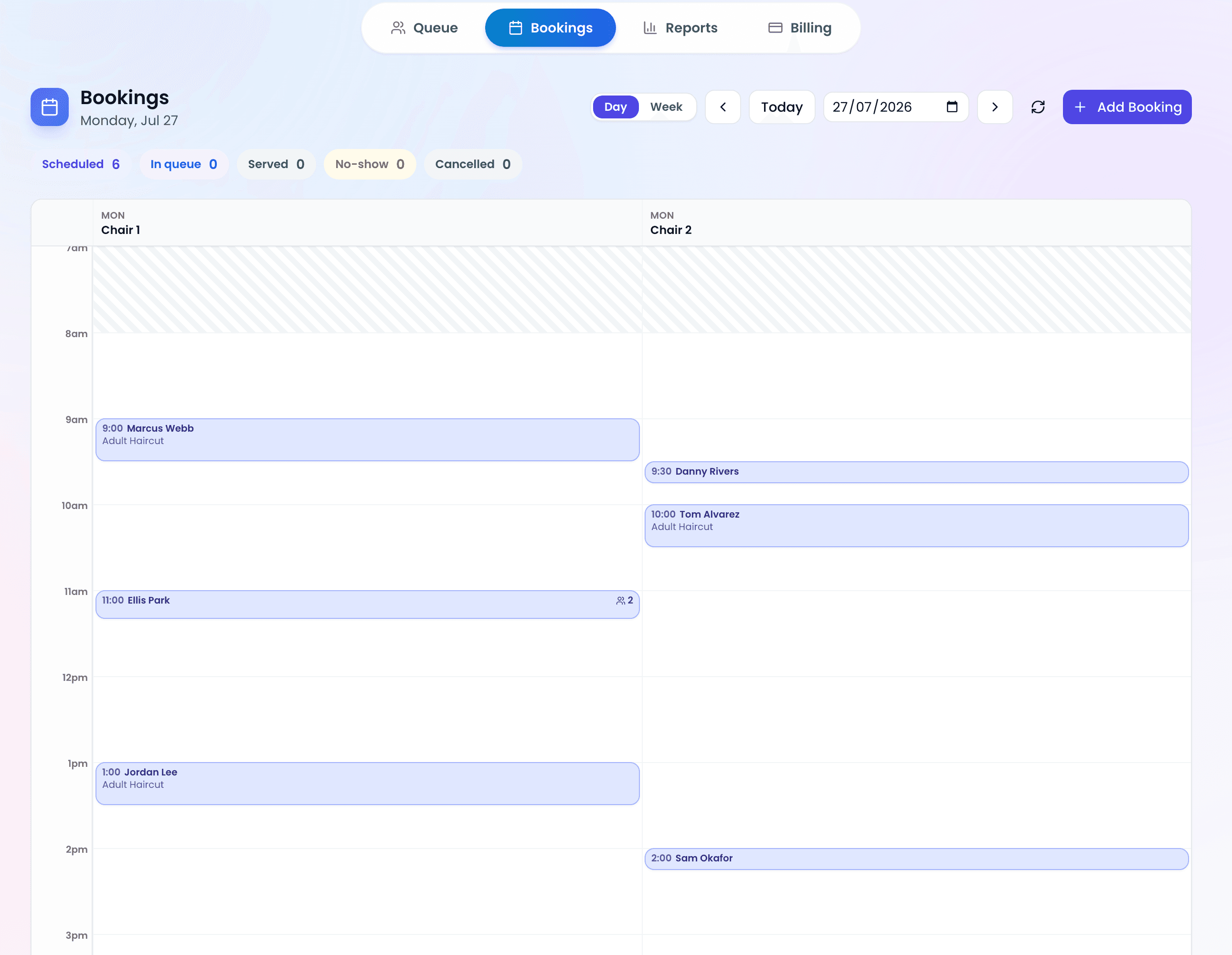
Appointment booking allows customers to reserve a specific time slot in advance. The business controls the schedule, allocating fixed windows for each service. Customers arrive at their designated time and are served with minimal or no wait.
Key characteristics of appointment booking:
- Pre-planned capacity. The business knows exactly how many customers to expect and when, enabling precise staffing.
- Guaranteed service time. Customers have a confirmed slot, reducing uncertainty and wait anxiety.
- Advance commitment. Customers commit to a specific time, which increases show-up reliability (especially with reminders).
- Structured scheduling. The business controls the pace and volume of service delivery.
Head-to-Head Comparison
The following table compares virtual queues and appointment booking across the dimensions that matter most for business operations:
| Dimension | Virtual Queue | Appointment Booking |
|---|---|---|
| Customer effort | Low (scan and go) | Medium (find slot, book ahead) |
| Wait transparency | High (real-time position) | High (confirmed time) |
| Capacity utilization | Dynamic (no wasted slots) | Fixed (no-shows waste slots) |
| Demand handling | Absorbs spikes naturally | Caps demand at capacity |
| Walk-in friendliness | Excellent | Poor (no slots available) |
| Staff planning | Reactive (based on real-time flow) | Proactive (based on bookings) |
| No-show impact | Minimal (next person moves up) | Significant (empty slot) |
| Revenue from walk-ins | Maximized | Often lost |
| Setup complexity | Low (QR code + dashboard) | Medium (calendar + rules) |
| Best for | Variable demand, walk-ins | Predictable demand, time-sensitive |
When to Use a Virtual Queue
Virtual queues are the superior choice when your business has unpredictable demand patterns, a high volume of walk-in customers, or service times that vary significantly.
Virtual queues are ideal for:
- Restaurants with walk-in traffic. Diners rarely plan casual meals 24 hours in advance. A virtual queue for restaurants captures this spontaneous demand without turning anyone away.
- Walk-in barber shops. Many barber shops thrive on the walk-in model. Customers drop in when they need a cut, and a virtual queue lets them wait at the coffee shop next door instead of in a crowded chair.
- Retail stores during peak periods. Product launches, sales events, and holiday rushes generate unpredictable demand that cannot be scheduled.
- Government and public services. Citizens arrive throughout the day with varying service needs. A virtual queue manages flow without requiring advance scheduling.
- Events and festivals. Pop-up food stalls, attraction queues, and registration desks all benefit from virtual queuing during high-volume, time-limited events.
When to Use Appointment Booking
Appointment booking excels when your service requires specific preparation, fixed time allocation, or when customers have strong preferences about when they are served.
Appointment booking is ideal for:
- Medical and dental clinics. Providers need preparation time, patient records must be reviewed, and service duration is relatively predictable.
- Consultation-based services. Financial advisors, lawyers, and accountants require dedicated, distraction-free time with each client.
- Specialty salons and spas. Complex treatments (color, extensions, facials) have fixed durations and require material preparation.
- Capacity-constrained venues. Businesses with strict capacity limits (tasting rooms, escape rooms, small studios) need to control flow precisely.
The Hybrid Approach: Using Both
For many businesses, the answer is not "either/or" but "both." A hybrid model uses appointment booking for planned visits and a virtual queue for walk-ins, with both streams managed in a single system.
How hybrid works in practice:
- Allocate a percentage of capacity to appointments (e.g., 60% of time slots) to ensure scheduled customers are served promptly.
- Reserve remaining capacity for walk-ins managed through a virtual queue. Walk-ins fill the gaps between appointments and capture additional revenue.
- When an appointment no-shows, the next person in the virtual queue fills the slot automatically. This eliminates dead time.
The hybrid model is particularly effective for barber shops and salons that want to offer booking for regular clients while still capturing walk-in traffic. It is also common in urgent care clinics that accept both scheduled patients and walk-ins.
Pro Tip — Start with Queue, Add Appointments Later: If you are unsure which model to choose, start with a virtual queue. It is simpler to set up, requires no schedule management, and gives you immediate data on your customer flow patterns. After a few weeks, you will know exactly when demand peaks occur and whether appointment slots would help smooth the load.
Decision Matrix: Which Model Fits Your Business?
Use this matrix to quickly identify the best approach based on your business characteristics:
| Business Characteristic | Virtual Queue | Appointments | Hybrid |
|---|---|---|---|
| 80%+ walk-in customers | Best | Poor | OK |
| 80%+ pre-scheduled customers | Poor | Best | OK |
| Mix of walk-ins and bookings | OK | OK | Best |
| Variable service times | Best | Poor | Best |
| Fixed service duration | OK | Best | Best |
| High no-show rates | Best | Poor | Best |
| Requires prep time per customer | Poor | Best | OK |
| Strict capacity limits | OK | Best | Best |
Industry-Specific Recommendations
Based on the decision matrix above, here are specific recommendations by industry:
| Industry | Recommendation | Reasoning |
|---|---|---|
| Casual restaurants | Virtual Queue | Walk-in dominant, variable party sizes, spontaneous visits |
| Fine dining | Appointments | Planned occasions, prep required, capacity managed |
| Walk-in barber shops | Virtual Queue | Walk-in model, short service times, spontaneous demand |
| Full-service salons | Hybrid | Regular clients book, walk-ins fill gaps, varied service lengths |
| Medical clinics | Appointments | Record prep needed, regulatory requirements, predictable durations |
| Urgent care | Hybrid | Walk-in nature, but some patients prefer scheduling |
| Retail stores | Virtual Queue | Spontaneous visits, variable browsing times, spike demand |
| Government services | Hybrid | High volume, some services bookable, walk-ins inevitable |
Making the Switch: What to Consider
If you are currently using one model and considering switching or adding the other, here are practical considerations:
Moving from Paper Lists to Virtual Queue
- Transition time: Same day. Print a QR code, train staff for 10 minutes, and you are live.
- Customer communication: Add signage explaining the new system. Most customers adapt immediately because they already use QR codes for menus.
- Fallback plan: Keep your paper list for the first week as backup. You will not need it after day two.
Adding Appointments to an Existing Queue System
- Start with 30-40% appointment capacity and keep the rest for walk-ins. Adjust based on actual booking patterns.
- Set clear priority rules: Do appointments get served at their exact time, or do they enter the queue at their arrival? Define this upfront to avoid staff confusion.
- Monitor no-show rates. If appointment no-shows exceed 20%, consider requiring deposits or reducing appointment allocation.
Frequently Asked Questions
Can I use both a virtual queue and appointment booking at the same time?
Yes. Many businesses run a hybrid model where scheduled customers have reserved slots and walk-ins join a virtual queue for remaining capacity. Both streams are managed from a single dashboard.
Which is cheaper to implement?
Virtual queue systems are typically cheaper and faster to set up. They require only a QR code and a cloud-based dashboard. Appointment booking systems require calendar management, reminder systems, and sometimes payment integrations. Many platforms like ScanQueue offer free tiers for virtual queuing.
Do virtual queues work for appointment-based businesses?
They can, particularly for managing day-of capacity. Even appointment-heavy businesses benefit from a virtual queue for same-day overflow, cancellation backfill, and walk-in capture.
What happens when an appointment customer is late?
With a hybrid system, a late appointment customer can be placed into the virtual queue at their arrival position. The next walk-in customer fills the gap, so no capacity is wasted.
How do customers feel about virtual queues vs appointments?
It depends on the context. For spontaneous visits (restaurants, barbers, retail), many customers prefer to join a queue when they arrive. For planned services (medical, consultations), many prefer a booked time. Offering both gives customers the choice they prefer.
Related: Want both? See how to run walk-ins and appointments in one queue.
Start with a Virtual Queue — Free
ScanQueue makes it easy to eliminate physical lines with QR code check-in, SMS notifications, and real-time queue management. Try it free and see the difference in your first week.
Start Free with ScanQueue →Stop losing walk-ins to wait times
Set up ScanQueue in 5 minutes. Customers scan a QR code, get SMS alerts when it's their turn, and wait anywhere.
- Free plan — no credit card
- No app download for customers
- QR code, SMS, and WhatsApp notifications
ScanQueue Team
Queue Management Experts
Helping businesses reduce wait times and improve customer experience with smart queue management solutions.