Most virtual queue software is designed for businesses that look nothing like a small retail store. The vendors that dominate Google search results sell to airports, banks, and government agencies. Their products are powerful, their pricing starts in the four figures per month, and they assume you have an IT team and a hardware refresh budget. None of that fits a single-location boutique, a four-store independent fashion brand, or a small electronics chain.
Small retail has its own queue patterns: weekend rushes, fitting-room bottlenecks, click-and-collect pickups, and the occasional Black Friday surge that exposes whatever workflow you have not yet automated. The right tool for this is not a stripped-down version of an enterprise platform. It is a different category of product entirely. For an overview of how virtual queueing applies to retail, see our retail queue management solution page.
This guide covers what small retail actually needs from a queue system, why hardware kiosks are the wrong answer, the platforms ranked by suitability, and a buyer guide for any retailer with fewer than five locations.
What Small Retail Actually Needs
A small retailer has different constraints from a department store. The queue tool has to fit those constraints, not fight them.
- Free or affordable starter plan. A small store testing a queue tool cannot commit to $500 a month before knowing whether customers will use it. A genuine free tier (not a 14-day trial) is the difference between trying it and ignoring it.
- No app download for customers. Asking shoppers to install an app for a 10-minute fitting-room queue kills adoption. QR code or web-link join is the only realistic option.
- SMS notifications included. SMS is the single highest-impact feature, and it is also where vendors hide costs. Look for plans with bundled SMS, not per-message overage charges.
- Fitting-room and click-and-collect support. A retail queue tool that only handles checkout queues misses two of the three real bottlenecks in a small store.
- Setup in minutes, not weeks. Small stores do not have a project manager. The platform has to be live the day the owner signs up.
- Multi-location support without enterprise pricing. A four-store chain should not pay enterprise fees per location.
Why Hardware Kiosks Are the Wrong Answer
Walk into a department store and you might see a self-serve kiosk for fitting-room sign-up or click-and-collect pickup. Walk into a 200-square-metre boutique and a kiosk would dominate the floor space, look out of place, and cost more than the queue problem it solves.
According to a 2018 Adyen survey run by 451 Research, US retailers lost an estimated $37.7 billion in potential sales over 12 months because shoppers left long lines. That number is the headline that vendors quote at procurement meetings. For small independent retailers, where shoppers often come in for a specific item and know the staff, the problem usually looks different. It is not "shoppers walk out". It is "shoppers stand in awkward physical lines that ruin the in-store experience".
A virtual queue solves this without hardware. Customers join via a QR code, browse the store while they wait, and get an SMS when the fitting room or click-and-collect counter is ready. The store gets the same flow management as a department store kiosk, at a fraction of the cost and without losing any floor space.
Top 5 Virtual Queue Systems for Small Retail
1. ScanQueue
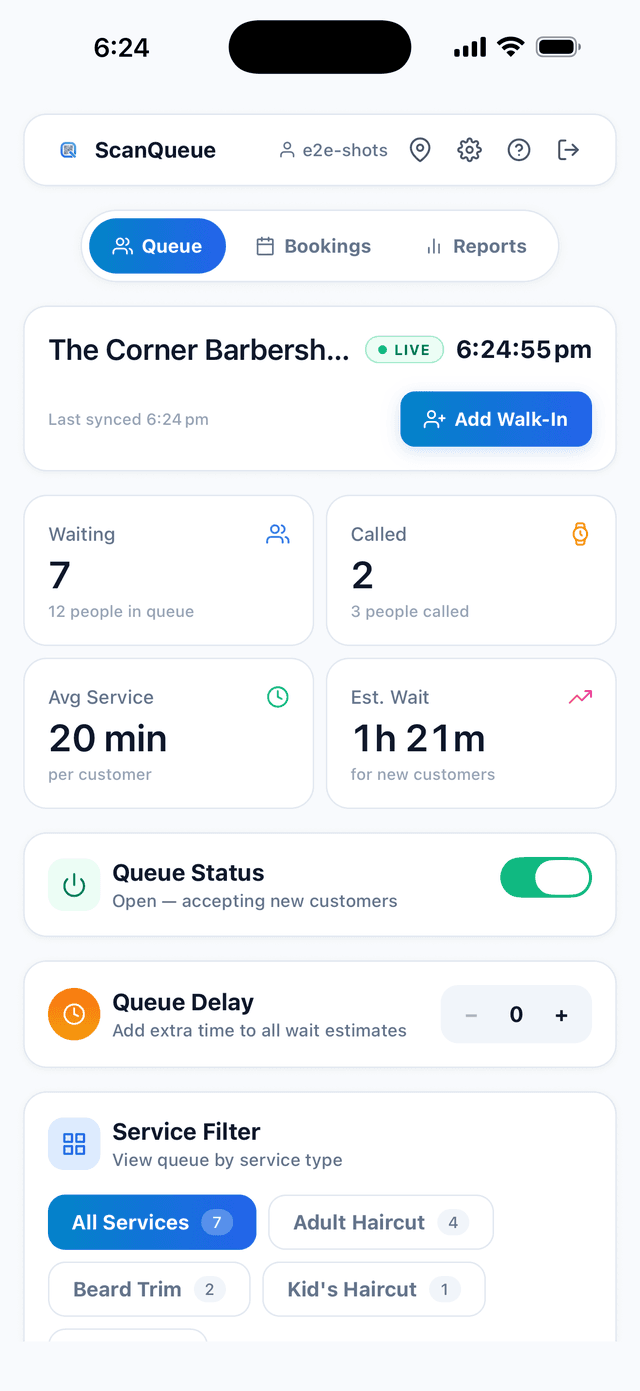
ScanQueue is purpose-built for small businesses, including small retail. The setup flow takes minutes, customers join by scanning a printed QR code, and SMS notifications are bundled into paid plans. Multi-service queues let a single store run a fitting-room queue and a click-and-collect queue side by side without paying for separate seats.
- Pricing: Free Starter plan. Essential from $49/mo. Growth from $99/mo. Pro from $249/mo.
- Best for: Boutiques, independent retail chains, small electronics stores, click-and-collect operations.
- Standout: Genuine free tier, multi-service queues, SMS bundled.
- Limitations: No physical kiosk hardware option (cloud-only).
2. Waitwhile
Waitwhile sits between queue management and appointment booking. It works well for retail stores that also offer styling appointments, watch repairs, or other booked services alongside walk-in flow. Price scales with monthly visits across all locations, which is the catch for busy stores. See our deeper ScanQueue vs Waitwhile comparison for details.
- Pricing: Free for 1 location with limits. Paid from $31/mo (Starter, billed monthly).
- Best for: Single-location stores that mix walk-ins and appointments.
- Standout: Strong appointment plus walk-in hybrid.
- Limitations: Pricing scales with monthly visits, so busy multi-store retailers move up tiers quickly.
3. NextMe
NextMe is a clean, focused virtual waitlist that is easy for staff to learn in a single shift. It works well for stores with a single primary queue (typically fitting rooms or pickup) and minimal operational complexity. See our ScanQueue vs NextMe comparison for the side-by-side breakdown.
- Pricing: Free tier available. Starter from $49.99/mo billed annually.
- Best for: Very small retail with a single queue type.
- Standout: Simplest interface in the category.
- Limitations: Analytics and reports require the Business plan.
4. Qless
Qless is one of the longer-running virtual queue platforms and supports retail among many other verticals. It is more capable than NextMe but heavier, and the interface shows its age. Pricing leans toward mid-market rather than small business.
- Pricing: Custom pricing; no public price list.
- Best for: Mid-size retailers with dedicated operations support.
- Standout: Mature feature set, broad vertical experience.
- Limitations: No public pricing, dated UI, oversized for sub-five-location retailers.
5. Qminder
Qminder is widely cited as a top queue management product, but it is built around dedicated service-desk environments. For small retail, it is feature-rich but priced at a level that makes more sense for mid-market.
- Pricing: From $869/mo (Business).
- Best for: Larger retailers with dedicated service counters.
- Standout: Strong analytics and visitor management.
- Limitations: Starting price is roughly 4x what most small retailers should pay.
Comparison Table
| Platform | Free Tier | Paid From | Multi-Queue | Best For Small Retail |
|---|---|---|---|---|
| ScanQueue | Yes | $49/mo | Yes | Excellent |
| Waitwhile | Yes (limits) | $31/mo | Yes | Good (single-loc) |
| NextMe | Yes | $49.99/mo (annual) | Yes | Good (basic) |
| Qless | No | Custom | Yes | Oversized |
| Qminder | No | $869/mo | Yes | Overkill |
Buyer Guide for Under-5 Location Retailers
Use this short decision framework to choose:
- Just trying it out? Start with ScanQueue's free Starter plan or NextMe's free tier. No credit card commitment.
- Need fitting room plus click-and-collect? ScanQueue's multi-service queues handle this on a single dashboard.
- Mix walk-ins and bookings (e.g. styling, repairs)? Waitwhile handles the appointment side better.
- Multi-store and want one bill, not per-location pricing? ScanQueue's plans are not per-location.
- Need an enterprise feature set and have the budget? Qminder, but expect to outgrow it down rather than up.
Implementation Tips
- Print your QR code at A4 and laminate it. A small printed sign at the fitting-room entrance and the click-and-collect counter is the only "hardware" you need.
- Test the SMS template once. Make sure the message is friendly, brief, and signed off as the store name. Customers should know who is texting them.
- Show your team the dashboard on their phones. Most small-retail staff manage the queue from their own phone or a shared iPad. The dashboard should be designed for that.
- Review the first weekend's data. Average wait, abandonment, and time-of-day distribution will tell you whether you need to adjust staffing or split a service into a separate queue.
Frequently Asked Questions
What is the best free virtual queue for a small retail store?
ScanQueue's Starter plan is free with up to 100 queue joins a month, a printable QR code, and a live dashboard. NextMe also has a usable free tier.
Do small stores actually need a queue system?
Any store that gets weekend or peak rushes, runs fitting rooms, or offers click-and-collect benefits from a virtual queue. Stores with always-light traffic do not.
Do customers have to download an app?
The platforms in this list use QR codes or web links, not apps. Customers scan and join in their browser.
Is SMS included in the price?
Some platforms bundle SMS, others charge per message. Confirm this before signing up. ScanQueue includes SMS allowances in paid plans.
Can one queue handle fitting rooms and click-and-collect at the same time?
Yes, with multi-service queues you can run both as separate queues under the same store account, each with their own SMS templates and wait-time logic.
How long does setup take?
Most small retailers are live within 10 minutes. Print the QR code, paste it where customers will see it, and start the queue.
Try the virtual queue built for small retail
Free plan, no credit card, set up in minutes. ScanQueue runs fitting-room and click-and-collect queues from a single dashboard.
Start free with ScanQueueRun a store? See our retail queue management.
Stop losing walk-ins to wait times
Set up ScanQueue in 5 minutes. Customers scan a QR code, get SMS alerts when it's their turn, and wait anywhere.
- Free plan, no credit card
- No app download for customers
- QR code, SMS, and WhatsApp notifications
Fernando Mendes
Founder, ScanQueue
Helping businesses reduce wait times and improve customer experience with smart queue management solutions.