Most small businesses face the same problem: walk-in customers want to be served now, booked customers expect their reserved slot, and staff are stuck juggling two separate systems. The result? Double-bookings, frustrated customers, and wasted time when no-shows leave gaps in the schedule.
The solution is not choosing between a queue system and a booking system. It is using both in one place. This guide shows you exactly how.
Why Walk-In Businesses Need Appointment Booking
Walk-in businesses have traditionally avoided booking systems because they add complexity. But a booking option lets customers who want certainty reserve a slot, without turning away walk-ins.
The benefits of adding appointments to a walk-in business are concrete:
- Predictable demand: You know how many customers are coming and when, making staffing decisions easier
- Fewer walkaways: Customers who can book ahead are less likely to leave when they see a queue
- Higher revenue per hour: Filling gaps between walk-ins with booked appointments keeps your team productive
- Better customer experience: Giving customers the choice between walking in or booking ahead puts them in control
The challenge has always been how to combine the two without creating chaos. That is exactly what a unified queue and booking system solves.
How a Unified Queue and Booking System Works
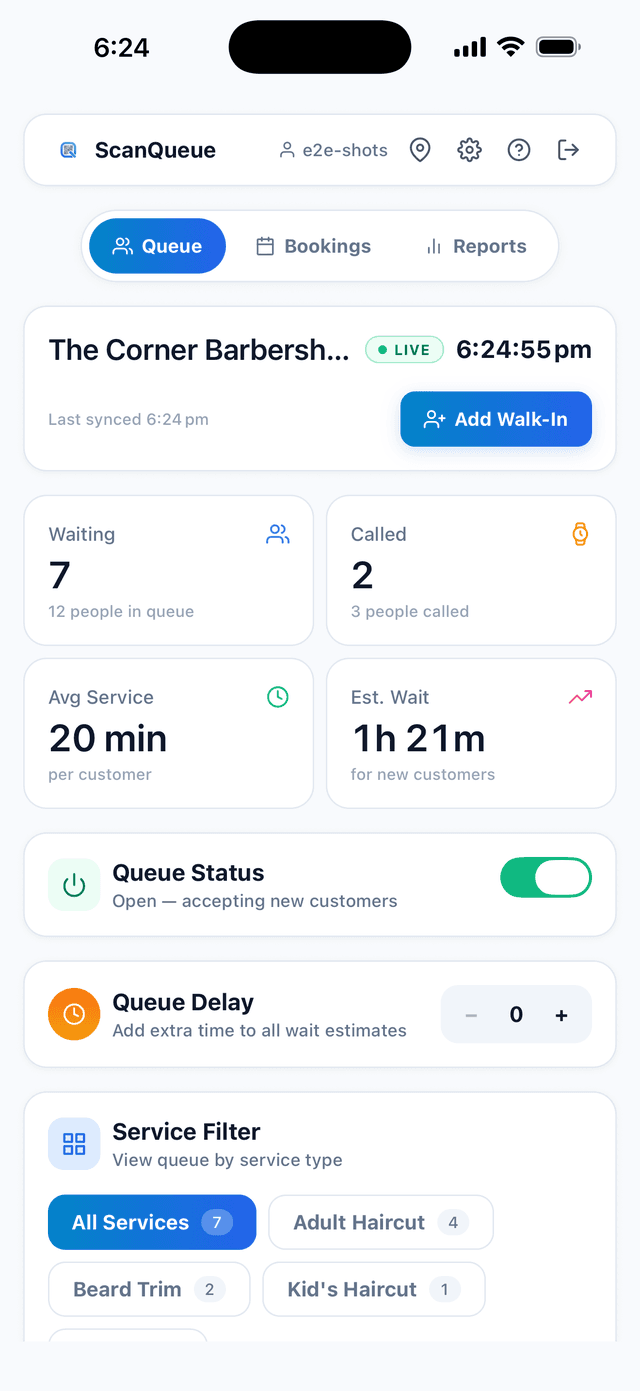
In a unified system like ScanQueue, appointments and walk-ins live in the same queue. There is no separate booking calendar to check, no manual syncing between systems, and no risk of double-booking a time slot.
Here is how the flow works in practice:
- A customer books a time slot through your booking page (accessible via QR code or a direct link). No app download required.
- They receive automatic SMS reminders 24 hours and 1 hour before their appointment.
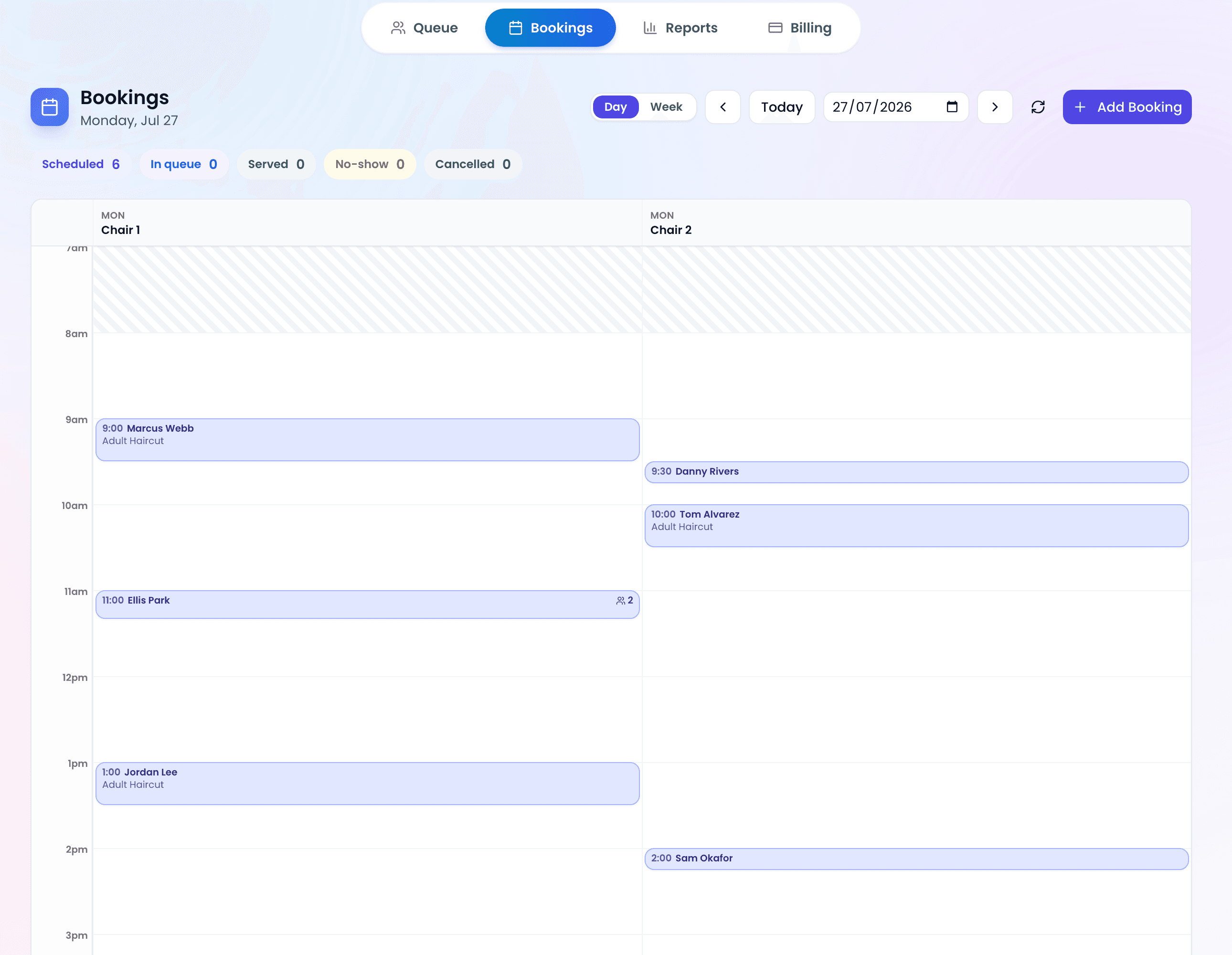
- When they arrive, staff tap "Check In" on the dashboard. The customer joins the live queue.
- Walk-in customers join the same queue by scanning a QR code or being added by staff.
- Both types are served from the same view with real-time position tracking, SMS notifications, and wait time estimates.
This means staff only look at one screen, customers only interact with one system, and the business gets a complete picture of demand across both channels.
Key Insight: Appointments are not a replacement for walk-in queues. They are an addition. The best-performing businesses offer both and let customers choose how they want to be served.
Reducing No-Shows with SMS Reminders and Smart Rebook
No-shows are the hidden cost of appointment scheduling. For a barbershop doing 40 appointments per week, even a 10% no-show rate means 4 lost slots every single week.
ScanQueue tackles no-shows on two fronts:
Automatic SMS Reminders
Customers receive automatic notifications throughout their booking lifecycle: confirmation, a 24-hour reminder, a 1-hour reminder, a short reminder just before the time, a nudge once they are running late, and a message if the booking is missed, plus cancellation and reschedule confirmations. A 2008 study of hospital eye clinic appointments, published in BMC Ophthalmology, found that patients who got an SMS reminder were 38% less likely to miss their appointment than those who got no reminder.
The wording of each of those messages is yours to edit in Settings, and any of them can be switched off. Where a customer is reachable on WhatsApp, booking messages go by WhatsApp and fall back to SMS automatically.
Smart Rebook: Filling Freed Slots Automatically
When a customer cancels or reschedules within the next 4 hours, the system does not just leave a gap. Smart Rebook automatically offers the freed slot to walk-in customers already waiting in the queue.
Here is how it works:
- A cancellation frees a slot within the next 4 hours
- The system identifies walk-in customers on the same service who joined within the last 30 minutes
- Those customers receive an SMS with a one-tap claim link
- The first person to tap the link gets the slot, transitioning from walk-in to booked appointment
This turns every cancellation into an opportunity. Instead of lost revenue, you get a satisfied walk-in customer who gets served faster than expected.
A Standby List for Sold-Out Days
Smart Rebook only helps if somebody is waiting. The standby list covers the other case. When every slot on a day is booked out, customers can join that service's queue as a standby list instead of hitting a dead end and going elsewhere. If a spot opens, you call the next standby customer exactly the way you call anyone else in the queue.
Deciding How Much Booking You Actually Want
Adding bookings to a walk-in business does not have to be all or nothing. A few controls decide how far you open the door:
- Take bookings without publishing a booking page. Turn bookings on and leave "Let customers book online" off. Your team can create timed bookings from the dashboard while the public page still shows the waitlist only. This suits shops that take bookings by phone or at the counter.
- Set a minimum notice. Stop someone booking the 9:05 slot at 9:04. Zero notice means customers can take the next slot going.
- Set a booking window. Decide how far ahead customers can book, from a couple of days for a barbershop to weeks out if you are selling timed entry.
- Enable booking per service. Take bookings for the long jobs and keep the quick ones walk-in only.
For a full walkthrough of the feature itself, including the staff calendar and every setting, see how bookings work in ScanQueue.
Setting Up Appointment Booking: Step by Step
Getting started with appointment booking on ScanQueue takes about 10 minutes. Here is the process:
1. Define Your Services
Go to Settings → Services and create the services you offer. For each service, set an estimated duration (e.g., "Haircut: 30 minutes", "Colour Treatment: 90 minutes"). This determines how long each slot blocks out on the schedule.
2. Set Your Operating Hours
Configure your business hours in Settings → Operating Hours. The booking system uses these to show available time slots. You can set different hours for different days, add breaks, and create date-specific exceptions for holidays.
3. Enable Appointments Per Service
Turn on appointments for each service individually. This gives you granular control. For example, a barbershop might accept bookings for "Haircut" and "Beard Trim" but keep "Quick Lineup" as walk-in only.
4. Share Your Booking Link
Your booking page is available at scanqueue.com/book/your-business-name. Share it on social media, add it to your Google Business Profile, or print a QR code alongside your walk-in queue code. Customers can also discover it from a "Book a Time" link on your walk-in join page.
5. Manage Everything from One Dashboard
The Appointments tab on your dashboard shows all bookings in a familiar calendar view. You can check customers in, reschedule, cancel, or create bookings on behalf of walk-in customers who prefer a guaranteed time slot.
Walk-In and Appointment Awareness: Smarter Wait Times
One of the most common concerns about adding appointments to a walk-in business is fairness. Will booked customers jump the queue? Will walk-in customers get pushed back?
ScanQueue handles this with a configurable awareness system. By default, appointments and walk-ins operate independently. Walk-in wait times are not affected by upcoming bookings, and booking availability is not affected by the current walk-in queue.
But if you want tighter integration, you can enable appointment-aware ETAs. When enabled:
- Walk-in wait time estimates automatically factor in upcoming booked appointments, giving customers more accurate expectations
- Booking availability dynamically adjusts based on current walk-in demand, preventing overbooking during peak times
This bidirectional awareness is rare. Most systems treat appointments and walk-ins as completely separate worlds. Connecting them means better estimates, fewer surprises, and a smoother experience for everyone.
Who Should Use Queue-Based Appointment Booking?
This approach works best for businesses that serve a mix of walk-in and booked customers:
- Barbershops and salons: Let regulars book their weekly trim while still welcoming walk-ins
- Restaurants and cafes: Accept reservations for dinner service while managing the lunch walk-in rush
- Clinics and wellness centres: Schedule consultations alongside urgent walk-in visits
- Activity centres and entertainment venues: Let customers pre-book time slots for busy weekends while accepting walk-ins on quieter days
- Retail services: Schedule fittings, consultations, or returns while serving the shop floor
If your business sees both planned and spontaneous customers, a unified queue and booking system gives you the flexibility to serve both without the overhead of managing two separate tools.
Appointment Booking vs. Standalone Scheduling Tools
Standalone scheduling tools like Calendly, Acuity, and Square Appointments are excellent for pure-booking businesses. But they were not designed for walk-in environments.
Here is where a queue-integrated booking system differs:
| Feature | Standalone Scheduler | Queue + Booking (ScanQueue) |
|---|---|---|
| Walk-in queue management | ❌ | ✅ |
| Appointment booking | ✅ | ✅ |
| Single dashboard for both | ❌ | ✅ |
| Smart Rebook (auto-fill cancellations) | ❌ | ✅ |
| Cross-channel wait time awareness | ❌ | ✅ |
| QR code join for walk-ins | ❌ | ✅ |
| Real-time TV display | ❌ | ✅ |
| SMS notifications (queue + reminders) | Limited | ✅ |
The key difference is context. A standalone scheduler knows a customer has a booking. A queue-integrated system knows a customer has a booking and there are three walk-ins ahead and the service is running 10 minutes behind. That context makes everything more accurate.
Getting Started
Appointment booking is available on ScanQueue's Growth plan and above. If you are already using ScanQueue for walk-in queue management, adding appointments takes about 10 minutes:
- Define your services with time estimates
- Set your operating hours
- Enable appointments on the services you want
- Share your booking link
If you are new to ScanQueue, start with a free account to set up your walk-in queue, then upgrade to Growth when you are ready to add bookings.
Your customers already want the choice between walking in and booking ahead. Give it to them.
Stop losing walk-ins to wait times
Set up ScanQueue in 5 minutes. Customers scan a QR code, get SMS alerts when it's their turn, and wait anywhere.
- Free plan — no credit card
- No app download for customers
- QR code, SMS, and WhatsApp notifications
ScanQueue Team
Queue Management Experts
Helping businesses reduce wait times and improve customer experience with smart queue management solutions.