Best WaitQ Alternative — ScanQueue
By the ScanQueue TeamLast updated
ScanQueue is a WaitQ alternative with a free plan, QR check-in, and SMS plus WhatsApp included — no kiosks or sales calls.
WaitQ is the waitlist that keeps walk-ins from walking out starting at $27/month. This page covers why teams switch, the trade-offs to weigh, and how to migrate. ScanQueue covers the core queue features of WaitQ and adds AI wait predictions, a free plan with QR check-in, and responsive support.
When to Choose ScanQueue over WaitQ
- You want a permanent free plan to start with. WaitQ offers only a 7-day trial, while ScanQueue Starter stays free for as long as you need it.
- You send a lot of notifications. At $49 ScanQueue Essential includes 800 WhatsApp notifications plus SMS fallback, while WaitQ Grow includes 400 credits shared across SMS and WhatsApp at the same price.
- You want to know your bill in advance. ScanQueue publishes every allowance by plan, while WaitQ does not publish what extra notifications cost once your credits run out.
- You want cancelled bookings to refill themselves. Both tools take reservations, but ScanQueue smart rebook auto-offers a cancelled slot to the next customer through a claim link.
- You want AI wait predictions, voice or phone check-in, and an API. WaitQ offers none of these.
- You want your team on a real app. ScanQueue ships native iOS and Android staff apps for calling the next customer and running a kiosk, while WaitQ is browser-only for staff.
Why Switch from WaitQ?
Better Features
ScanQueue includes AI wait predictions, advanced analytics, SMS and WhatsApp notifications, and an AI receptionist for chat joins.
Free Plan Available
Unlike WaitQ, ScanQueue offers a generous free plan perfect for small businesses just getting started.
Responsive Human Support
Get fast, friendly support from real humans who understand your business needs.
WaitQ Limitations
While WaitQ is a capable solution, many businesses find these limitations frustrating:
- No free plan
- Small notification credits shared between SMS and WhatsApp, from 100/month
- Extra notification pricing is not published
- No AI, voice, API, or integrations
- Analytics history capped at 30 to 90 days
- No native staff app
What Teams Notice After Switching
- A free plan to start and to fall back on, instead of a trial that expires in 7 days.
- Roughly double the notification allowance at the same monthly price, with every limit published up front.
- One dashboard for walk-ins and appointments, with smart rebook filling cancelled slots automatically.
- AI wait predictions and voice check-in that WaitQ does not offer.
- Native iOS and Android apps so staff can run the floor from a phone or an iPad kiosk.
- Room to grow into multi-location and role-based access without changing tools.
What ScanQueue Offers Instead
ScanQueue was built to address the limitations of traditional queue management solutions:
- Free plan - Get started without any commitment or credit card
- AI wait predictions - Give customers accurate wait time estimates
- QR code check-in - No app download required for customers
- Unlimited SMS - No per-message charges on paid plans
- Responsive support - Fast, friendly help from real humans
- Easy migration - We'll help you switch from WaitQ
ScanQueue vs WaitQ at a Glance
| Area | ScanQueue | WaitQ |
|---|---|---|
| Kiosk check-in | Any tablet, auto-resets between guests, every plan | Yes |
| Free plan | Yes, permanent free tier with QR join and live tracking | No, 7-day trial only |
| Entry price | Free, then $49/mo Essential | $27/mo Starter, billed annually |
| Notifications | 800 to 7,000 WhatsApp per month by plan, SMS included | 100 to 1,000 SMS/WhatsApp combined per month by plan |
| Cost beyond your allowance | Published on the pricing page | Not published |
| Walk-ins + appointments | Unified queue with booking and smart rebook for cancelled slots | Queues and reservations, no automatic rebooking |
| Staff app | Native iOS and Android apps for staff and kiosk mode | Browser only |
| AI wait estimates | Wait times learn from your queue history | Not available |
| Voice / phone check-in | Voice AI joins the queue via phone call | Not available |
| Live capacity / occupancy | QR entry + exit with a live count against your cap for events and venues | Not available |
| Hotel breakfast tagging | Reference List auto-tags guests from your PMS export | Not available |
| Per-barber queues | A queue per barber or chair, plus shared-pool mode | Single shared waitlist |
| Real estate open homes | Inspection mode with timed viewing slots | Not available |
| Google review requests | Auto-prompts served customers to leave a review | Not available |
| Analytics | Live analytics with full history and CSV export | 30 to 90 day history by plan |
| QR code join | Built-in, no app required | Built-in, no app required |
| Setup time | Under 5 minutes, self-service | Around 5 minutes, self-service |
Everything You Also Get That WaitQ Does Not
WaitQ covers the basics of queues and reservations. ScanQueue is a full queue platform with features built for specific industries. Here is the depth waiting on the other side.
Walk-ins, appointments & smart rebook
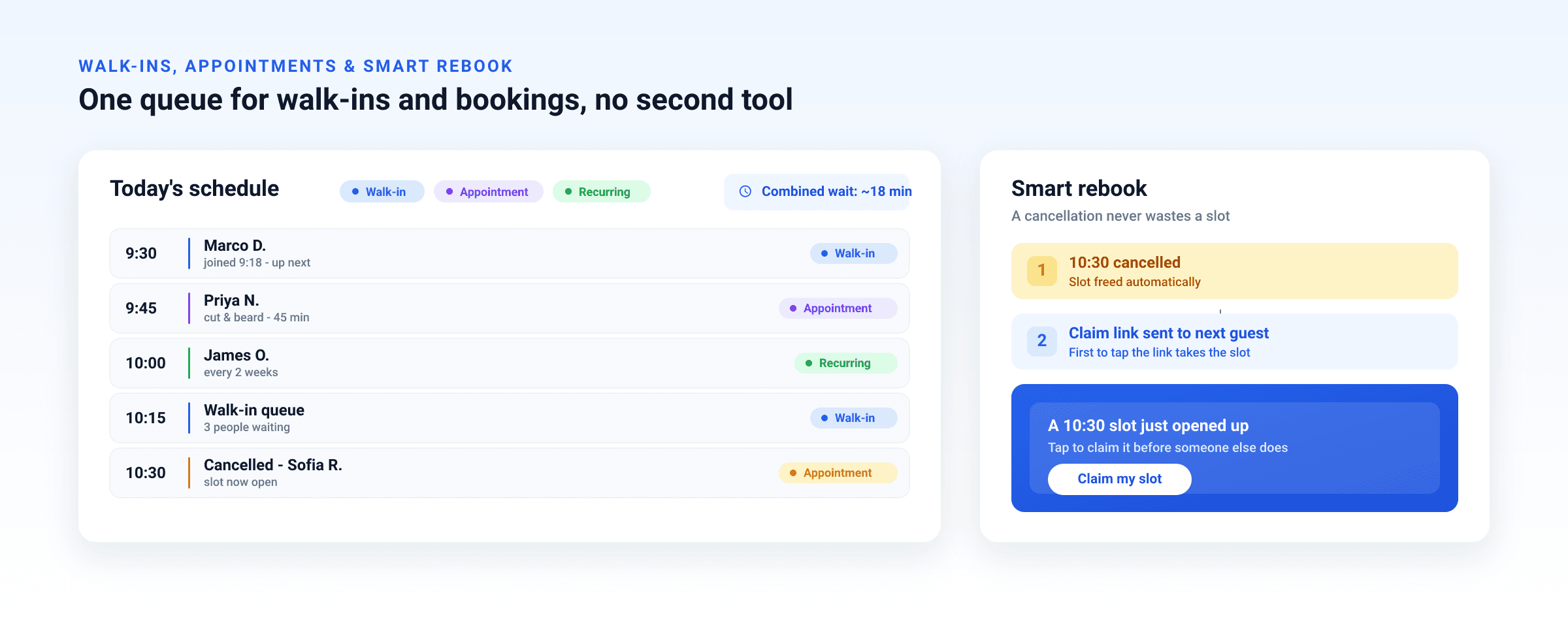
Run walk-in queues and pre-booked appointments in a single system instead of bolting on a separate booking tool.
Recurring appointments & reschedule
Book repeating appointments for regulars, and reschedule or convert a walk-in into a booking in a tap.
Smart rebook
When an appointment is cancelled, the freed slot is automatically offered to the next customer through a claim link.
Appointments aware of walk-ins
Wait estimates can account for both booked appointments and the live walk-in queue at the same time.
Per-service & per-counter queues
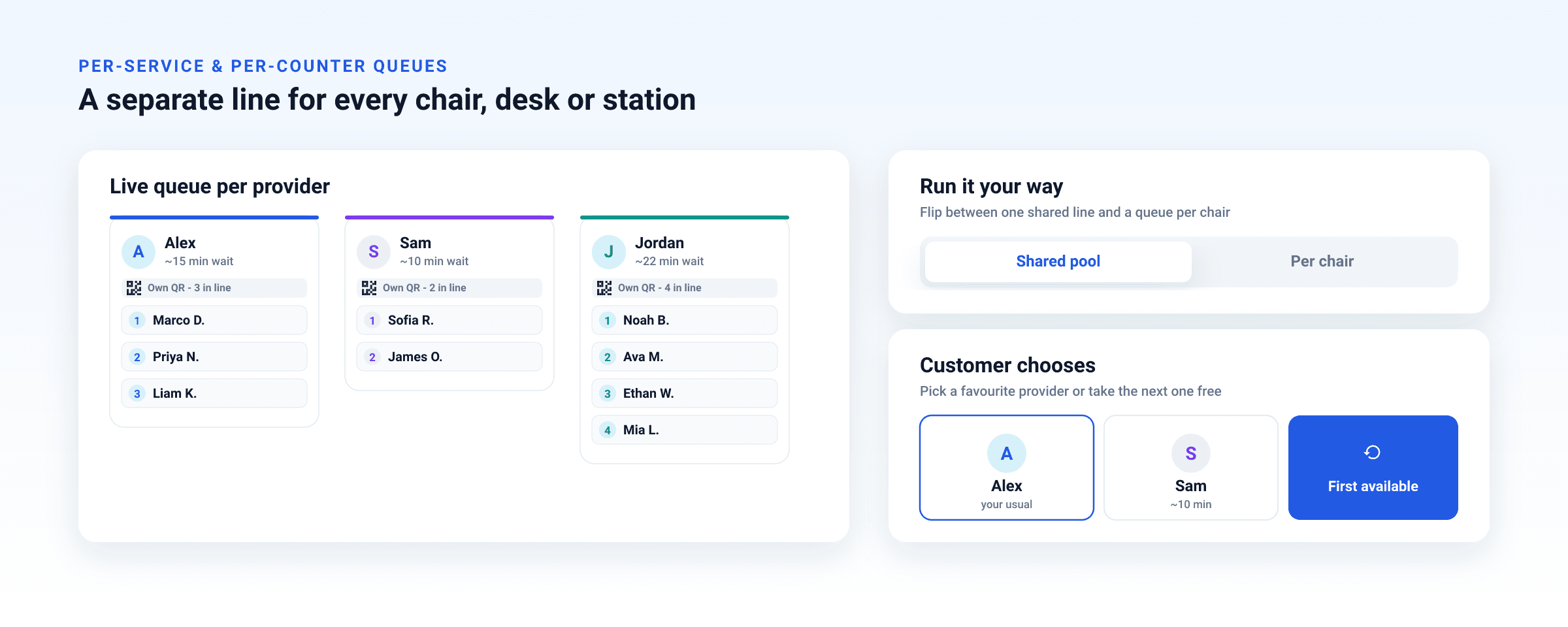
Each barber, chair, desk, or station gets its own queue and QR code, with a live view per provider.
Shared pool or per-chair mode
Switch between one shared line across the team and a separate queue per station to match how you run.
Counter picker or first available
Let customers choose their preferred provider or simply take the next one free.
Live capacity for events & venues
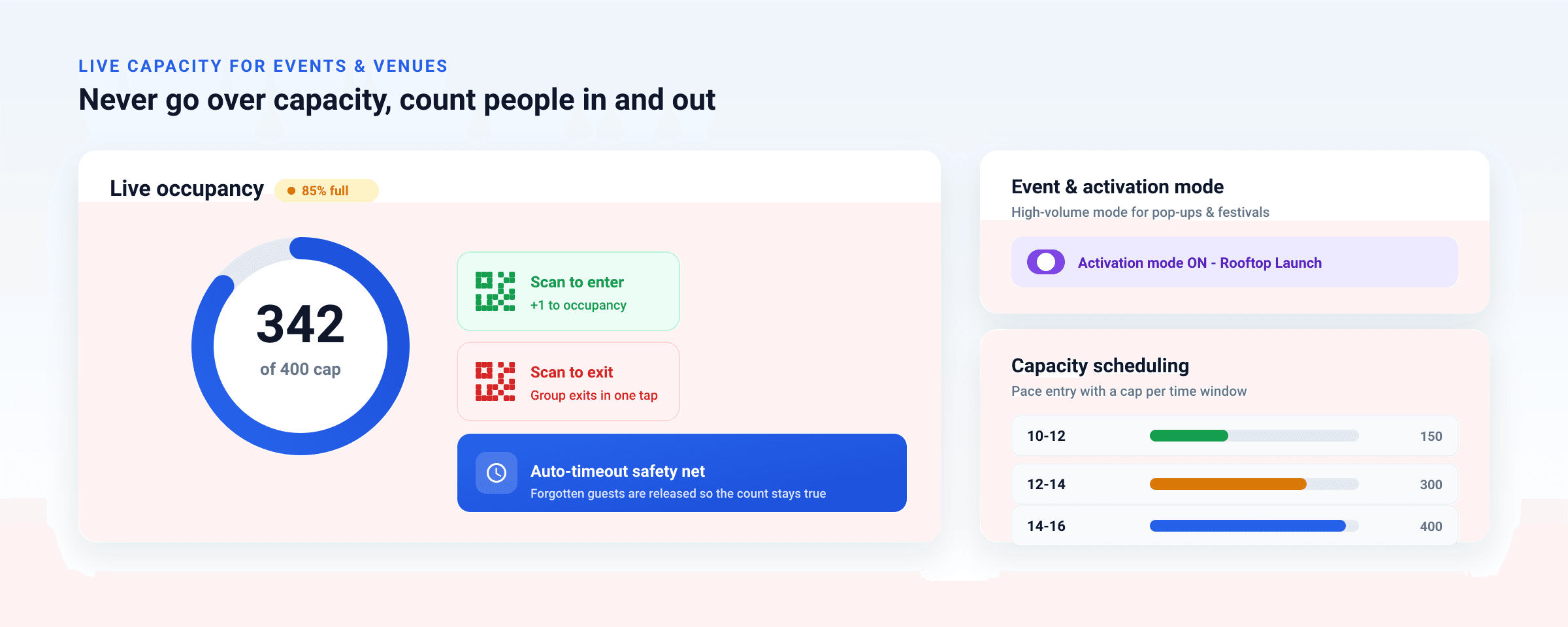
Track live occupancy against a set cap with QR entry and exit, one-tap group exits, and an auto-timeout safety net.
A high-volume mode tuned for time-limited events, pop-ups, festivals, and brand activations.
Set capacity limits per time window so entry paces itself across the day.
Hotels
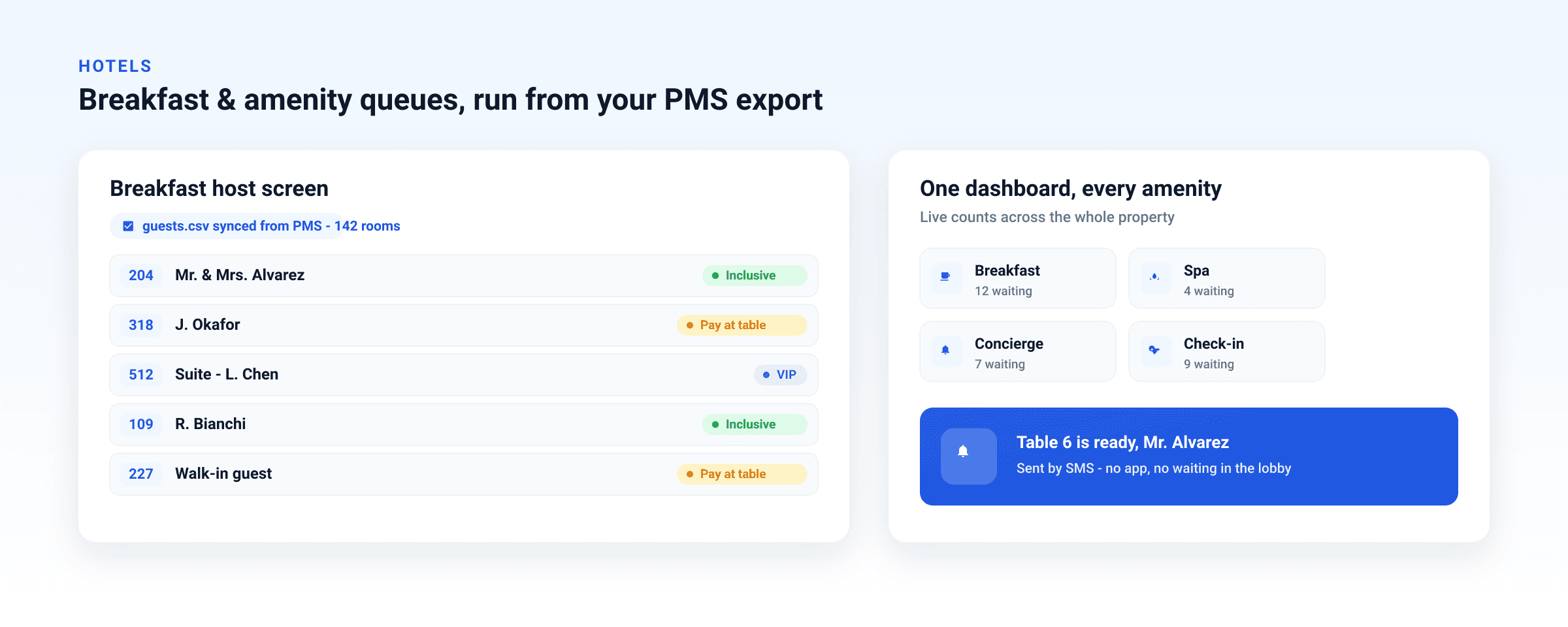
Upload your daily PMS export and guests are auto-tagged Inclusive, Pay, or VIP by room number on the host screen, no more spreadsheet cross-checking.
Run breakfast, spa, concierge, and check-in queues across the whole property from one dashboard.
Real estate open homes
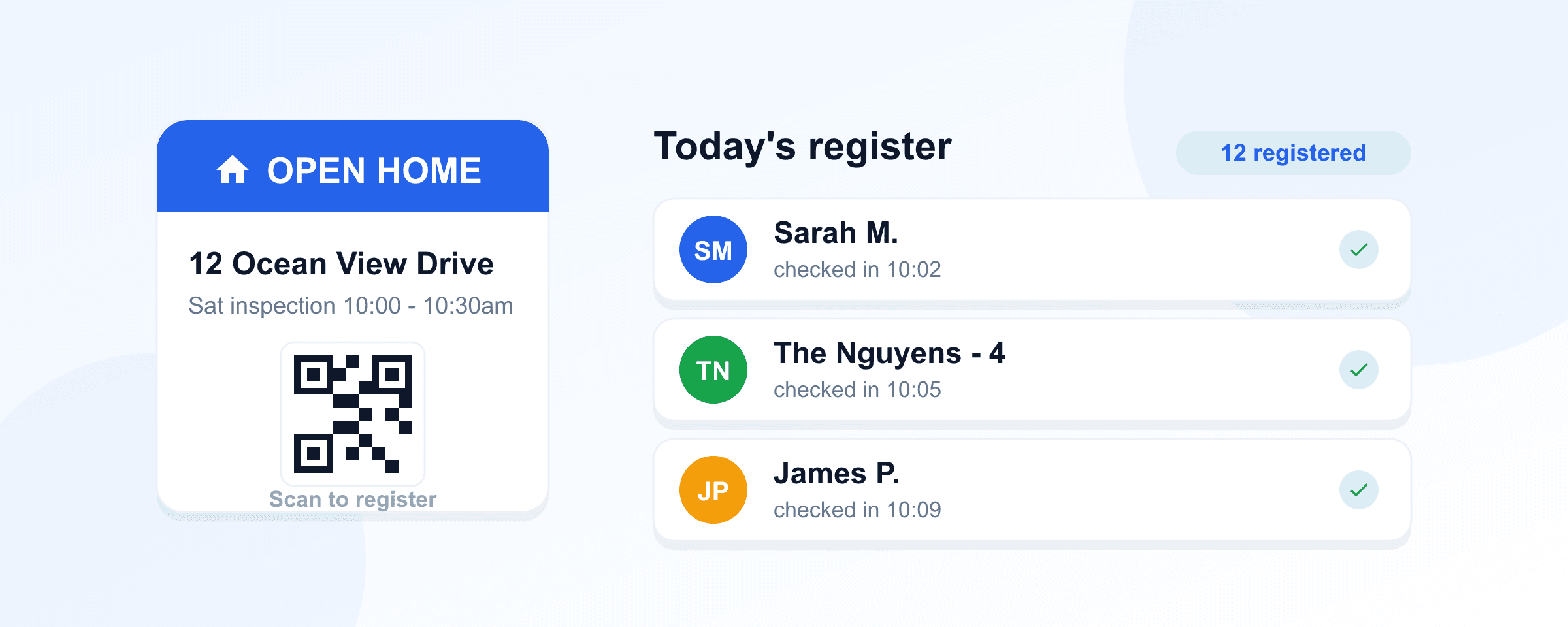
Inspection mode
Run timed viewing slots for open homes, with attendees checking in by QR.
Live inspection dashboard
See every slot and who has checked in across an inspection in real time.
Multi-channel notifications
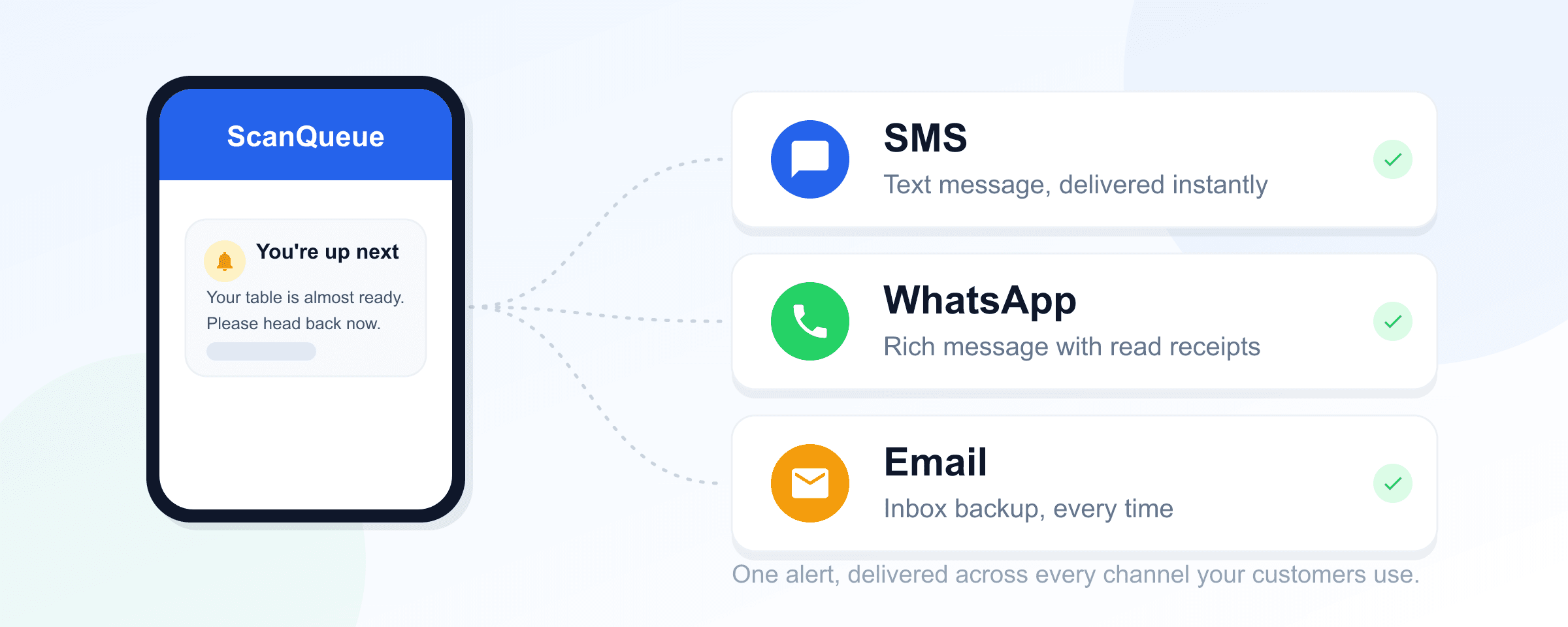
WhatsApp by default with automatic SMS fallback, plus email and voice, so messages actually land.
Heads-up and your-turn alerts
A configurable "you are up soon" message followed by a "your turn" alert when you call them.
Interactive SMS replies
Customers can text STATUS to check their position or LEAVE to exit the queue.
Bilingual English and Spanish
Send customer notifications in English or Spanish.
AI & voice
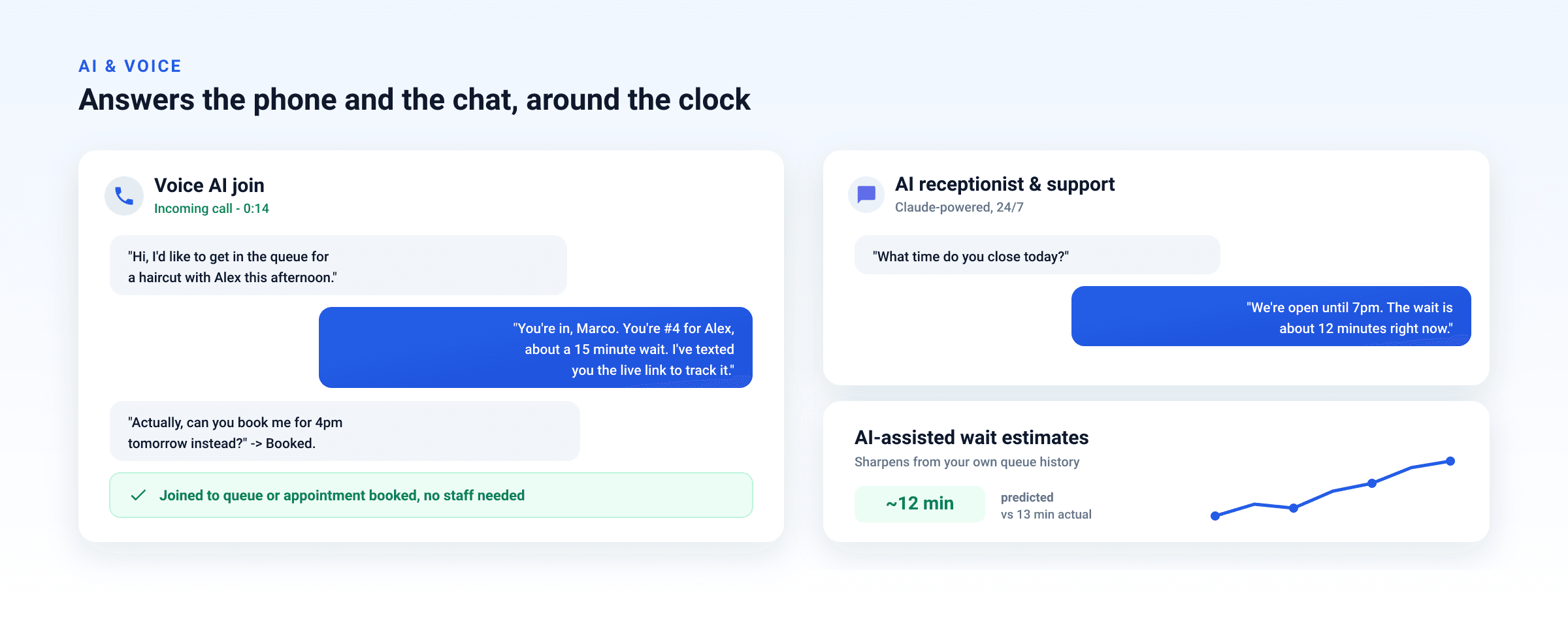
Voice AI join
Customers can phone in and a voice agent joins them to the queue or books an appointment.
AI receptionist & support chat
A Claude-powered agent answers customer questions and handles support around the clock.
AI-assisted wait estimates
Wait times sharpen over time by learning from your own queue history.
Staff queue control
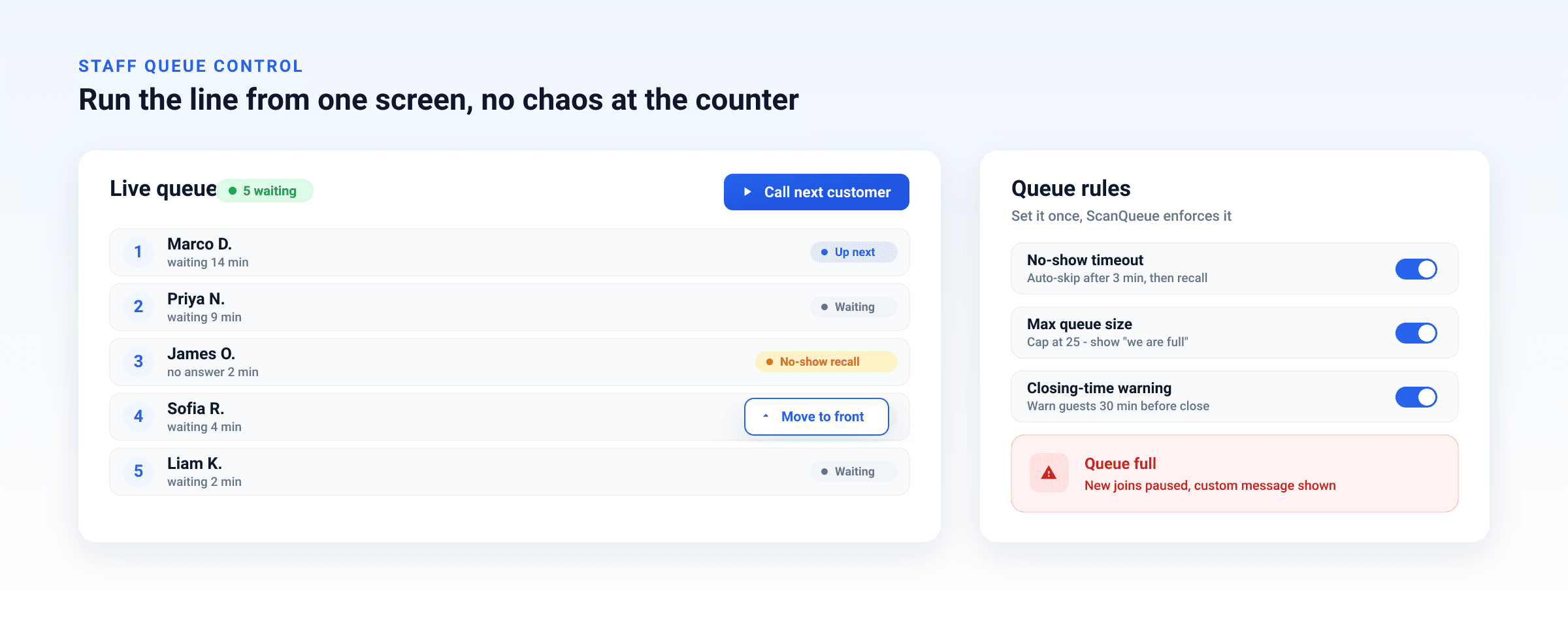
Call next, move to front, reorder
Full control of the line: call the next customer, move someone to the front, or reorder positions.
No-show timeout and recall
Auto-handle no-shows after a set time, and recall a missed customer back into the line.
Max queue size and closing warnings
Cap the queue with a custom "we are full" message and warn customers as closing time nears.
Staff apps & kiosk mode
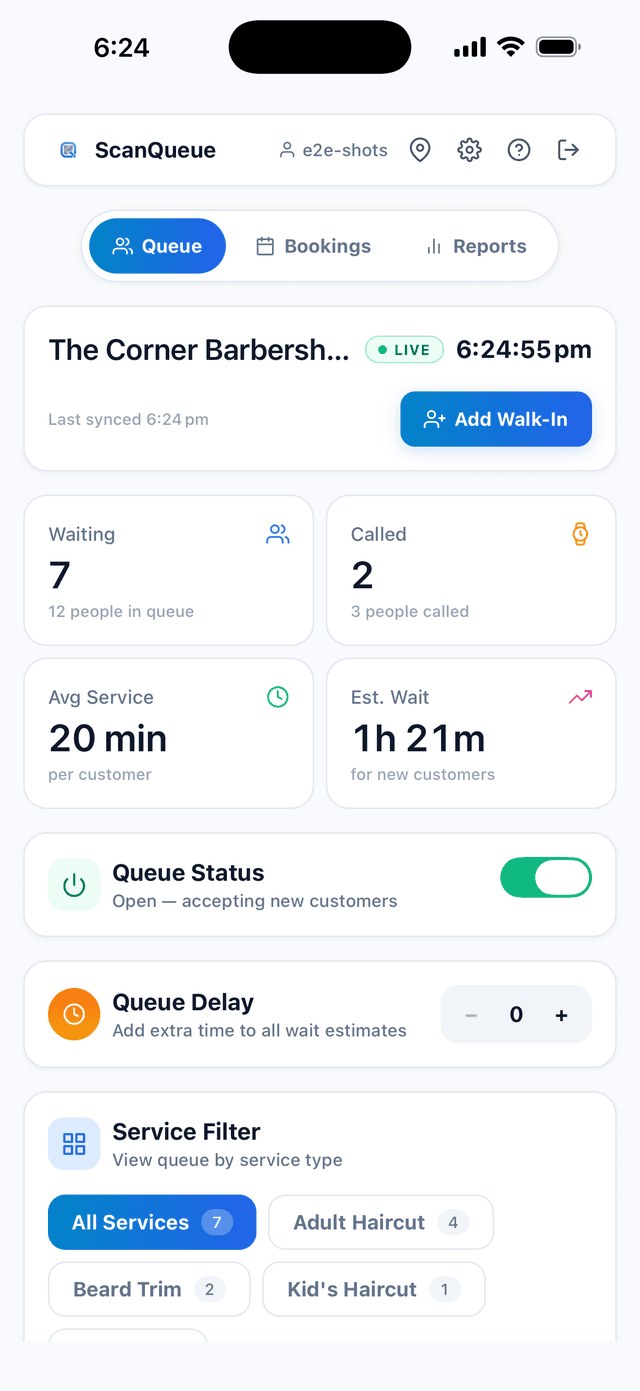
Native iOS and Android staff app
Your team calls the next customer, marks no-shows, and watches the live queue from a real app on their own phone, not a browser tab they keep losing.
iPad and phone kiosk check-in
Turn any spare tablet or phone into a self check-in kiosk at the door, on either platform.
Customers still download nothing
The app is for your staff only. Customers join by scanning a QR code and track their place in the browser, with no download ever.
Customer experience & branding
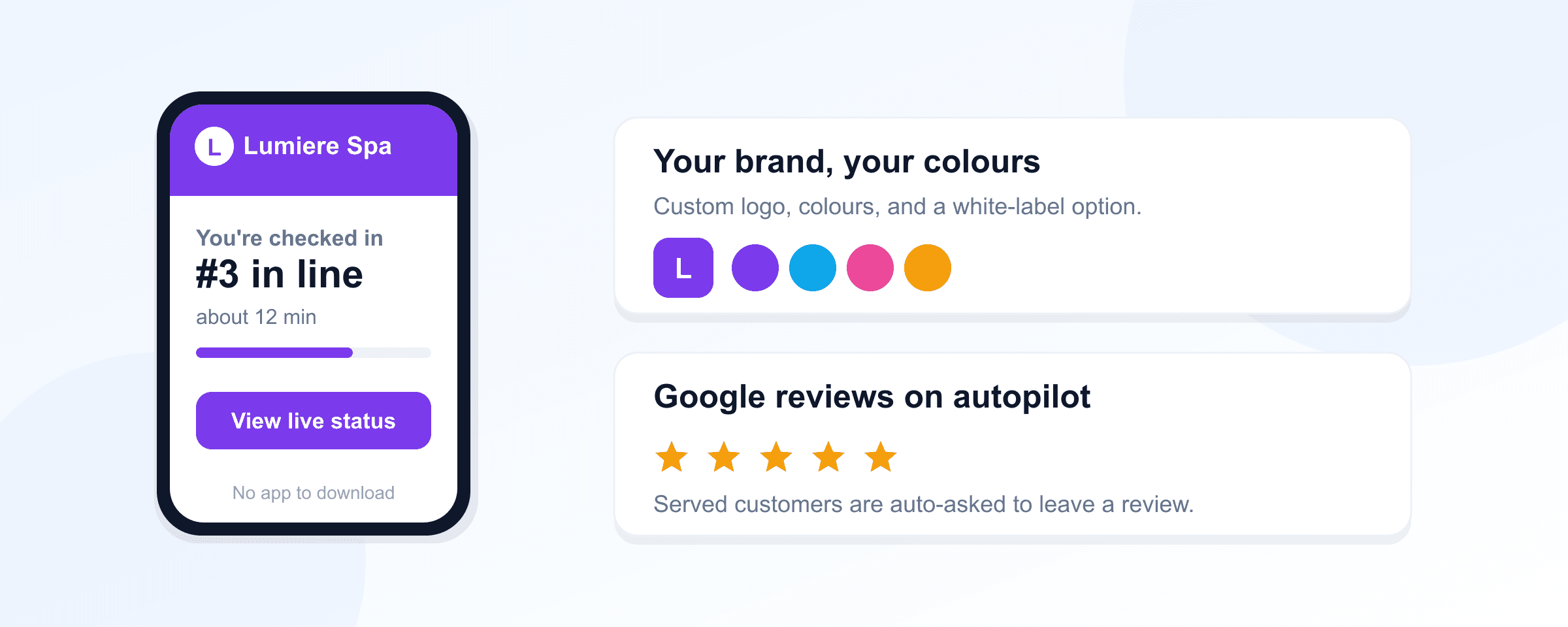
No-app QR join with live status
Customers scan to join in their browser and watch their live position and wait time, no download.
Custom intake form fields
Collect exactly the details you need at join, with required fields and field types you control.
Automatic Google review requests
After a customer is served, ScanQueue auto-prompts them by SMS or WhatsApp to leave a Google review, turning happy visits into ratings.
Branded thank-you screen
Finish on a thank-you screen with your own message and a call to action of your choice.
White-label branding
Use your own logo and colours and remove ScanQueue branding entirely on higher tiers.
Multi-location, teams & analytics
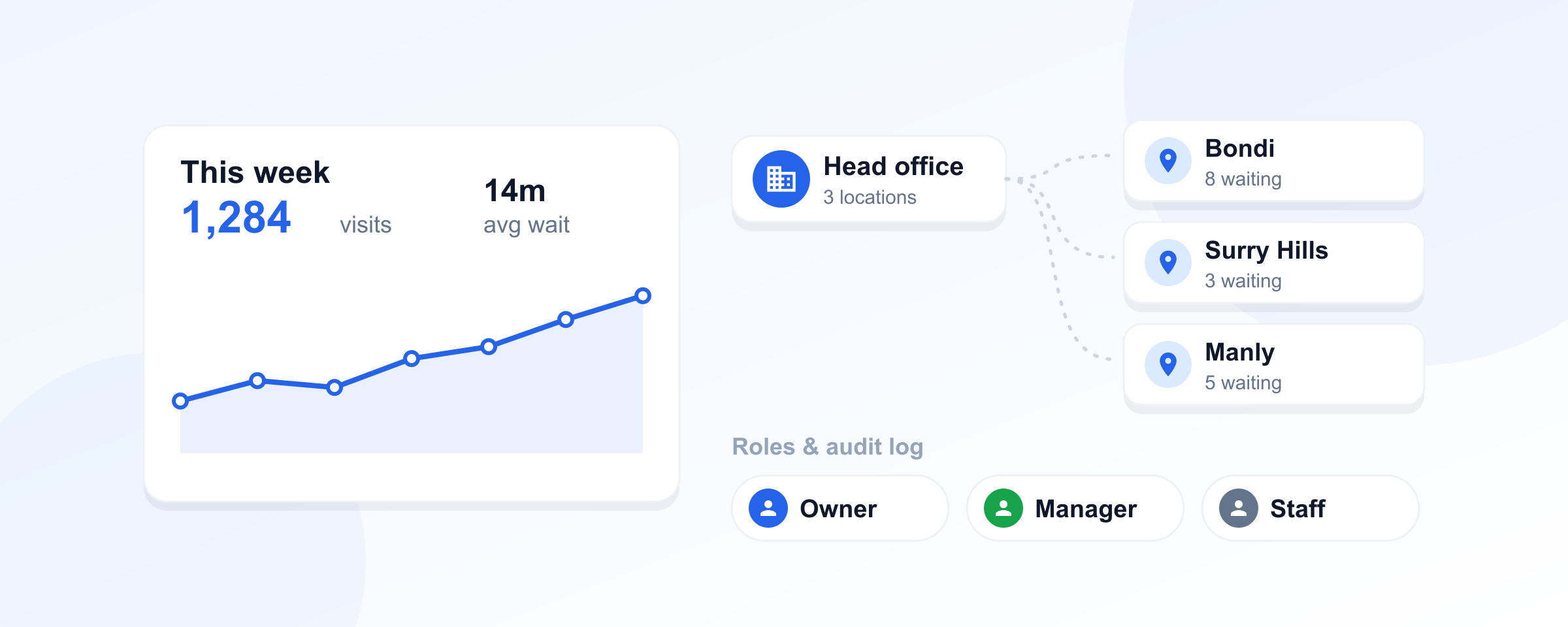
Manage every location from one account with central billing across all branches.
Roles, staff PIN login & audit log
Owner, admin, manager, and staff roles with quick PIN login and an immutable activity log.
Analytics with CSV export
Wait-time trends, peak hours, and no-show tracking with full history and CSV export, not a 30 to 60 day window.
Who WaitQ Might Be Right For
To be fair, WaitQ can be a good fit for certain businesses:
- Single-location walk-in businesses that want a simple, cheap queue
- Salons, barbershops, restaurants, and retail with basic queue needs
- Low-volume venues that stay comfortably inside a small notification allowance
However, for most small to medium businesses, ScanQueue provides better value with more features at a lower price point.
Switching from WaitQ to ScanQueue
Both tools are self-service, so most teams complete the switch in a single shift:
- 1
Sign up for a free ScanQueue account and create your first queue. Takes under 2 minutes.
- 2
Add your services, branding, and notification preferences to match your WaitQ setup.
- 3
Turn on appointment booking for any service that takes pre-booked slots, and enable smart rebook so cancellations refill themselves.
- 4
Print your ScanQueue QR code poster and run both systems side by side for one shift.
- 5
Retire WaitQ once your team is comfortable. No data import or onboarding call required.
WaitQ Alternative FAQ
See the Difference Before Your Trial Ends
Create a free ScanQueue account, set up a test queue, and compare it to WaitQ side by side. No credit card required, and the free plan never expires.