Barbershops are the businesses that use ScanQueue hardest, so most of what we build gets shaped by a shop with three chairs and a Saturday morning. The result is a pile of features that never get mentioned anywhere, because they were built for a specific problem a barber described rather than for a feature list.
This is the complete list, in the order a shop actually meets them. If you want the shorter pitch instead, that lives on our barbershop queue system page.
The walk-in queue
A client scans the QR on your door, window or mirror and joins from their own phone. No app, no account, no sign-up.
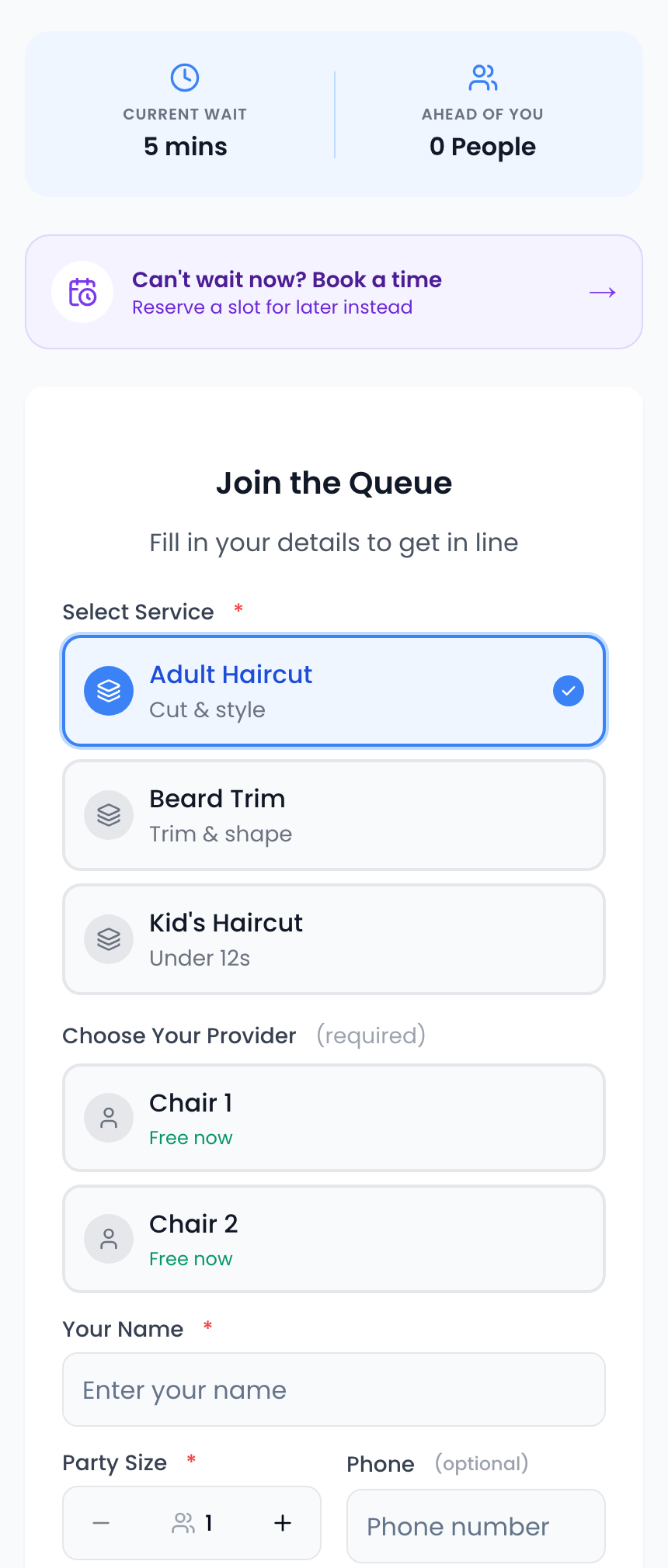
One screen: the wait, the services, and which barber is free right now.
- Live position and wait time on the client's phone, updating on its own. They can go for a coffee.
- Your own form. Rename, hide or require any field, add your own, put your logo and colours on it, write your own heading.
- Show or hide the wait, and optionally the total number of people waiting.
- Open and close the queue with one switch when you are full or closing up. Clients see a proper page with your next opening time, not a dead link.
- Walk-ins only mode. Keep the shop open but turn off self-join, so your team adds everyone at the counter.
- Self-serve mode for a tablet on the counter, with optional auto-start.
- Daily cap and rate limits so a prank or a bot cannot fill your morning.
Running late without punishing the people already waiting
Every shop runs behind at some point. The queue delay control pushes your quoted waits out by however many minutes you have lost, and it applies only to people who join from now on. Anyone already in the line keeps the time you promised them. Bumping everyone is how you turn one slow cut into ten annoyed clients.
Per-barber chairs
Each chair is set up as its own counter, and this is where a barbershop stops looking like a generic waitlist.
- Clients pick their barber, with a live status on each one: free now, or free in about N minutes with how many are ahead. Regulars who only sit with one person can see whether it is worth waiting.
- Or take whoever is free first. A shared next-available pool for clients who do not mind, running alongside the ones who do.
- A line per chair, or one line for the shop. Your call, and it changes how positions are counted.
- Each barber calls their own next client, and their name goes into the message the client gets.
- Assign services per chair. If only one barber does skin fades, only that chair offers it.
Rostered hours, so wait times stop jumping
This one is new, and as far as we know nothing else in this category does it.
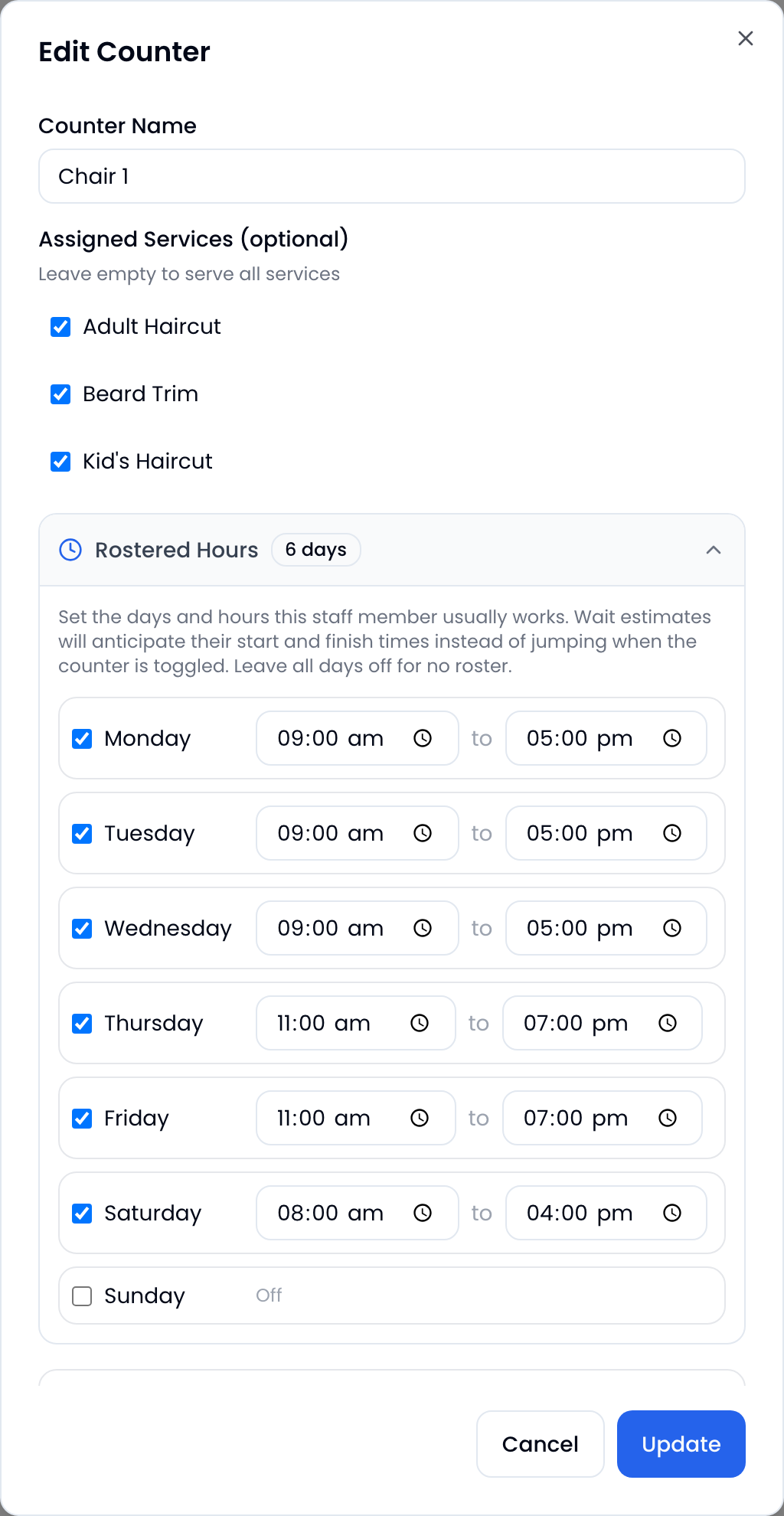
Weekly hours per barber, in the shop's own words: wait estimates anticipate shifts instead of jumping.
Give each barber the days and hours they usually work, and the wait maths looks ahead at who is about to start and finish rather than only counting who is on the floor this second. Without it, a client quoted 40 minutes at 1:50pm watches that drop to 20 the moment the 2pm barber clocks on, and rightly wonders whether any of the numbers mean anything. With it, the 2pm start was already priced in.
It works the other way too. Nobody gets quoted a wait that quietly assumes a barber who finishes at 5 is still cutting at 6.
Families and kids' cuts
A parent turning up with three kids is not one client, and treating them as one is how a queue quietly lies to everyone behind them.
Turn on multiple customers per join and the form asks how many people, then collects each name. Each one takes their own spot in the queue, linked as a group so your team can see they came together. The shop gets honest wait times, the parent fills in one form, and the family stays together in the running order.
Telling clients it is their turn
Four channels, and you choose which are on:
| Message | When |
|---|---|
| Welcome | On joining, with their ticket link |
| Almost your turn | A set number of minutes out, so they can walk back |
| You're up | When a barber calls them, naming the chair |
| Cancelled | If they are removed from the queue |
| Spot released | If they are marked a no-show |
These go by SMS, WhatsApp or email, in English or Spanish, with per-shop wording. Email is the fallback for clients who leave no mobile. Clients can be given the option to opt out.
Worth knowing when comparing: Waitwhile plans include only a one-time $2 SMS credit and SMS is then billed per segment; its help centre lists email, SMS and push, not WhatsApp. Our paid plans bundle a monthly allowance of both.
No-shows
Someone joins from across the road and vanishes. Set a timer and ScanQueue marks them a no-show automatically once it runs out, optionally calling the next client at the same time so the chair never sits empty waiting for a decision.
No-shows drop into a holding list rather than disappearing, so when they wander back in ten minutes later your team can put them straight back in without retyping anything.
Getting the Google review
This is the feature with the clearest return and the one most shops never switch on. After a client is marked served, ScanQueue sends them a message with a direct link to your Google review page, worded however you like.
You already have the phone number and you already know they just had a good cut. Asking at the chair is awkward and gets forgotten. Asking automatically, twenty minutes later, does not.
Bookings, if you want them
On Growth and above, the same system takes booked appointments alongside the walk-in line. Regulars book their usual chair, optionally on repeat every two weeks; walk-ins keep walking in; both appear in one place. There is a full walkthrough of how bookings work if that is the part you care about.
The join page also carries a "can't wait now? book a time" link, which converts the client who would otherwise have walked out.
Running the shop from your phone
There is a ScanQueue staff app for your team, and it exists because barbers do not want to keep walking back to a tablet at the counter between clients.
It is on the App Store and Google Play, free on every plan. It runs the same live queue as the web dashboard, on the same account, so whatever your team does on a phone shows up instantly on the counter tablet and on everyone else's screen. There is more detail on the app here.
From the chair, a barber can see who is waiting, call their next client, mark them served, and handle a no-show, without breaking off what they are doing. Your clients still install nothing: the app is for your team, and the client side stays a web page they reach by scanning a QR code.
The shop floor
- PIN logins for barbers. Your team taps a name and their staff PIN. No shared email, no password resets.
- A TV display for the waiting area, with your own ticker message and QR code.
- Printable signage and QR posters generated from the dashboard, for the door and the mirror.
- Safe under two thumbs. Two barbers tapping the same client, or one double-tapping, cannot double-call, double-message or lose someone. Every action checks the state it expects first.
Knowing what actually happened
Clients served, no-shows, cancellations, average wait, your busiest hour, and the same broken down per service and per barber. This is the data that answers whether Thursday late-night is worth staying open for, and which of your services is quietly eating the day.
Positions and wait times everywhere come from one shared calculation, so the number on the client's phone is the number on your screen. Systems that work these out separately drift apart, and the client always believes their phone.
More than one shop
On Pro, shops sit under one account with their own queues, chairs, services and messages, plus a combined view across all of them. Billing stays on the main account rather than one bill per shop.
What it costs
The Starter plan is free: up to 10 clients a day, QR check-in, live queue, per-barber chairs, no card. That is enough for a one-chair shop to run properly.
Paid plans add message volume, and bookings unlock on Growth. Multi-shop is Pro. Current numbers are on the pricing page, since they move.
Where to start
The shops that stick do the same three things in their first week: set up their real services with real durations, add a chair per barber, and physically put the QR code up where clients walk in. The ones who only fire a couple of test entries on signup day never get to the second week.
If you are weighing it up, managing barber walk-ins covers the operational side, and the barbershop queue system page has the short version. Or start free and have the queue running before your next Saturday.
Stop losing walk-ins to wait times
Set up ScanQueue in 5 minutes. Customers scan a QR code, get SMS alerts when it's their turn, and wait anywhere.
- Free plan — no credit card
- No app download for customers
- QR code, SMS, and WhatsApp notifications
ScanQueue Team
Queue Management Experts
Helping businesses reduce wait times and improve customer experience with smart queue management solutions.