A QR code check-in system lets customers scan a code with their phone to register their arrival — no clipboard, no receptionist, no app download. It is the simplest way to replace paper sign-in sheets with a digital workflow that is faster for customers and more useful for your business. A 2025 Juniper Research report found that over 2.2 billion people worldwide used QR codes for transactions and check-ins, and a 2024 Statista survey confirmed that 89% of consumers are comfortable scanning QR codes. The technology is mainstream — the question is no longer whether to adopt it, but which system to use.
This guide covers everything: what a QR code check-in system is, how it works, who benefits from it, the 5 best platforms available today, and a step-by-step setup walkthrough. If you are evaluating QR code queue solutions for your business, this is the only article you need.
What Is a QR Code Check-In System?
A QR code check-in system is a digital tool that uses QR codes to register arrivals at a physical location. Instead of writing their name on a clipboard or waiting for a host to greet them, visitors scan a printed QR code with their smartphone camera. A mobile-friendly form opens in their browser where they enter their details — name, party size, phone number, or whatever fields the business requires. Once submitted, they are checked in and added to the queue or attendance list automatically.
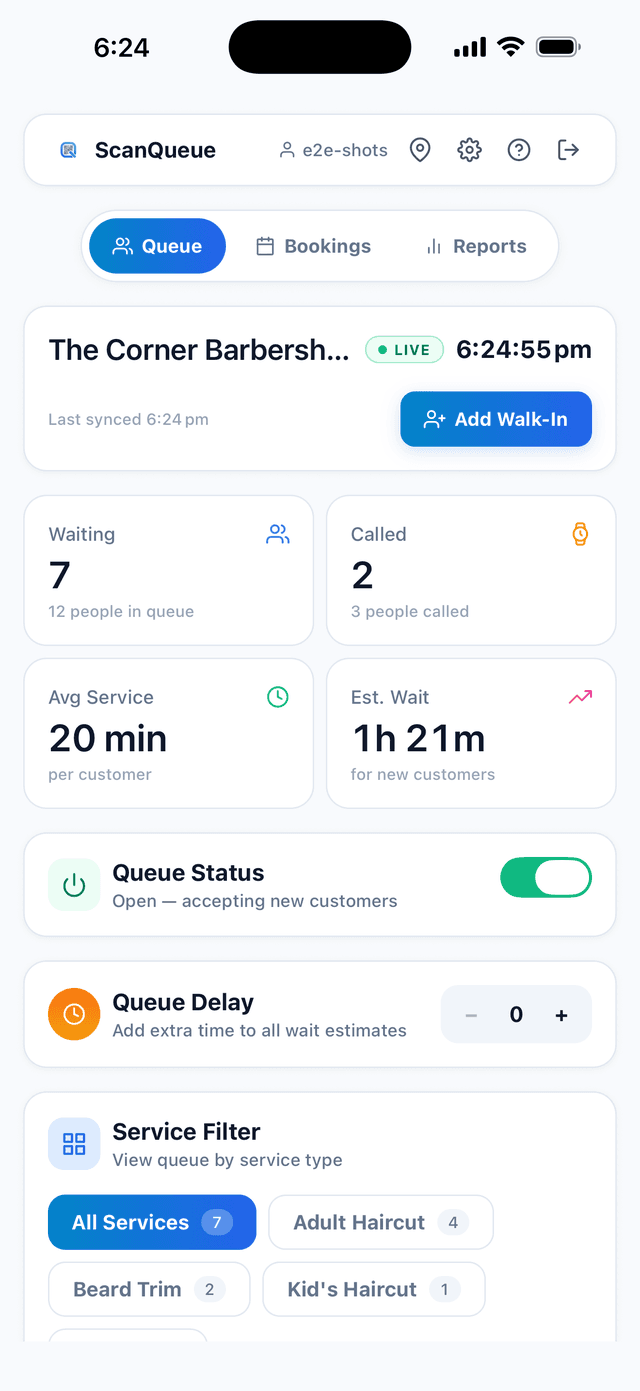
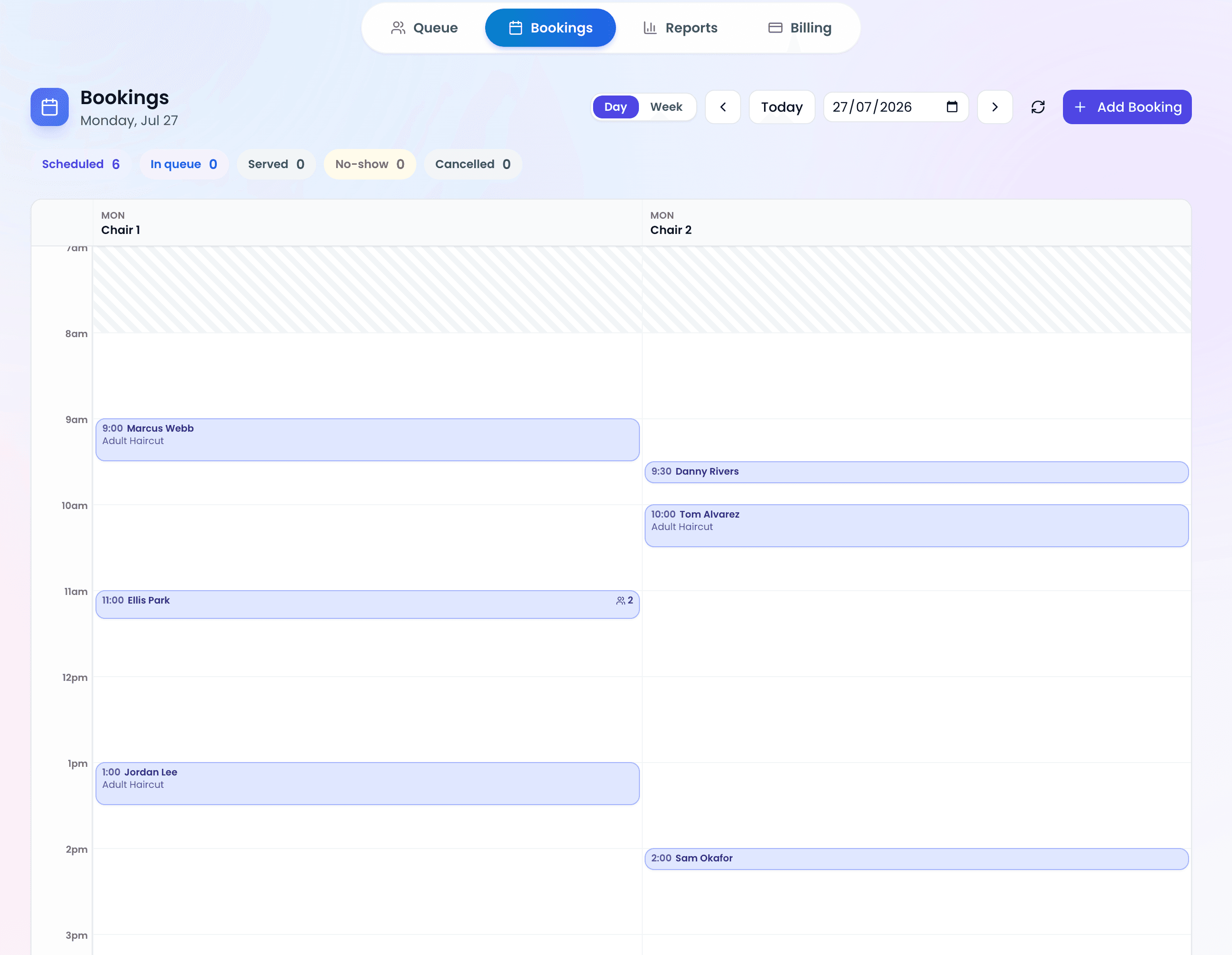
The system typically includes a staff-facing dashboard where employees can see who has arrived, manage the queue in real time, and send notifications when it is time for a customer to be served. More advanced systems add SMS alerts, estimated wait times, analytics, and multi-location management.
Think of it as an upgrade from the paper sign-in sheet — one that actually gives you data, saves staff time, and makes the customer experience frictionless. For a deeper look at how this fits into broader queue management, see our guide on what a queue management system is.
How a QR Code Check-In System Works (3 Steps)
The beauty of QR code check-in is its simplicity. The entire process happens in three steps:
Step 1: Scan
The customer walks up to your entrance, counter, or table and scans the QR code displayed there. Every modern smartphone — iPhone and Android — has a built-in QR scanner in the camera app. No special app required. The scan opens a web page in the customer's browser.
Step 2: Fill In Details
The web page displays a short form customized by the business. A restaurant might ask for name, party size, and phone number. A clinic might ask for name and appointment type. An event might only need a name and email. The customer fills it in and taps submit — typically under 15 seconds.
Step 3: Confirmation & Queue Entry
The customer instantly sees a confirmation screen with their queue position and estimated wait time. If the business has SMS notifications enabled, they also receive a text confirming their place. Meanwhile, the staff dashboard updates in real time — the new arrival appears immediately so staff can manage the flow.
Key Point: The customer never downloads an app, creates an account, or asks a staff member for help. The entire check-in happens on their own phone in seconds. This is why QR code check-in has adoption rates above 90% in businesses that implement it.
6 Benefits of a QR Code Check-In System
Why are businesses switching from clipboards and manual sign-ins to QR code check-in? Here are the concrete advantages:
- Contactless and hygienic — No shared pens, no clipboards, no physical contact. Customers use their own phone. This was the initial driver of adoption during the pandemic, and customer expectations for contactless options have not gone back.
- Faster check-in — A QR scan and form submission takes 10–15 seconds. Compare that to 30–60 seconds for a receptionist-led process or 20–40 seconds to find a pen and write on a clipboard. At scale, those seconds add up to shorter queues and fewer walkouts.
- Reduced staff workload — Staff no longer need to greet every arrival, write down names, or shout into the waiting area. The system handles check-in, position tracking, and notifications automatically, freeing staff to focus on serving customers.
- Accurate data collection — Paper sign-in sheets have illegible handwriting, missing fields, and no timestamps. A digital form captures clean, structured data every time — including exact arrival times for wait-time analytics.
- Real-time visibility — Staff see the full queue on a live dashboard. Managers can monitor wait times, spot bottlenecks, and make staffing decisions based on actual data instead of gut feeling.
- No app download required — This is the critical differentiator vs. native apps. QR code check-in works in the phone's browser. Zero friction means near-universal adoption. Every customer who can point a camera can check in.
Who Uses QR Code Check-In Systems?
QR code check-in is not limited to one industry. Any business or venue where people arrive and need to be tracked, queued, or registered can benefit. Here are the most common use cases:
- Restaurants and cafes — Walk-in guests scan to join the waitlist. The host seat tracks arrivals on a tablet instead of juggling a paper list.
- Barbershops and salons — Clients check in on arrival and wait comfortably (or run an errand) instead of sitting in a crowded waiting area.
- Medical clinics and dental offices — Patients check in from the parking lot. The waiting room stays uncrowded and staff know exactly who has arrived.
- Events and conferences — Attendees scan at the door for instant registration. Organizers get real-time headcount and can track attendance across sessions.
- Government offices and service centers — Citizens take a virtual ticket by scanning a QR code, reducing physical crowding and giving staff orderly queue management.
- Gyms and coworking spaces — Members check in for capacity tracking, class reservations, or access logging.
5 Best QR Code Check-In Systems Compared
We evaluated the top QR code check-in platforms on features, ease of setup, pricing, and customer experience. Here is how they stack up:
| Platform | Free Plan | SMS Alerts | Real-Time Dashboard | Multi-Location | Best For |
|---|---|---|---|---|---|
| ScanQueue | Yes | Yes (paid plans) | Yes | Yes | Small businesses & events |
| Waitwhile | Yes (limited) | Yes | Yes | Yes | Enterprise retail |
| Qminder | Trial only | Yes | Yes | Yes | Service centers & government |
| QueueBee | No | Yes | Yes | Yes | Healthcare & banking |
| Qlub | Yes | No | Basic | No | Simple single-location check-in |
1. ScanQueue — Best Overall for Small Businesses
ScanQueue is a purpose-built QR code queue and check-in system designed for small to mid-sized businesses. Customers scan a QR code, join the queue from their phone, and receive SMS notifications when their turn is near. The staff dashboard updates in real time via WebSocket, showing live positions, wait times, and customer details. Setup takes under 5 minutes — create an account, print your QR code, and you are live. The free Starter plan includes QR check-in, a live dashboard, and basic analytics. Paid plans add SMS notifications, multi-service queues, and detailed analytics. It is the strongest option for businesses that want a fast, no-friction check-in experience without enterprise complexity. See current pricing.
2. Waitwhile — Best for Enterprise Retail
Waitwhile targets larger organizations with complex queue workflows. It offers QR code check-in, appointment scheduling, and customer flow analytics. The platform integrates with Salesforce, Slack, and other enterprise tools. Pricing starts free for very basic use but scales quickly — the Business plan for multi-location starts at $199/month per location. Best for enterprise retail chains that need deep integrations and have the budget to match.
3. Qminder — Best for Service Centers
Qminder focuses on service-counter environments: government offices, telecom stores, banks, and university admissions. It includes QR code check-in, TV display integration for calling customers, and detailed service analytics. Pricing is not publicly listed (quote-based), and there is no permanent free plan — only a 14-day trial. Best for organizations with dedicated service counters and higher budgets.
4. QueueBee — Best for Healthcare & Banking
QueueBee is a full queue management suite popular in Southeast Asian healthcare and banking. It includes QR code check-in, digital signage, appointment booking, and customer feedback modules. The platform supports complex multi-department routing. Pricing is custom and typically requires an annual contract. Best for larger institutions that need an all-in-one queue management ecosystem.
5. Qlub — Best for Simple Single-Location Check-In
Qlub offers a lightweight QR code check-in solution focused on simplicity. Customers scan and check in with minimal fields. The dashboard is basic — no SMS notifications, no multi-location support, limited analytics. The free plan covers most small-venue needs. Best for businesses that only need a bare-bones digital sign-in replacement and do not need notifications or advanced features.
How to Set Up a QR Code Check-In System (Step by Step)
Here is how to go from zero to a working QR code check-in system using ScanQueue. The same general steps apply to most platforms.
Step 1: Create Your Account
Go to scanqueue.com/signup and register with your email. Enter your business name and confirm your email. You will land on a setup wizard that walks you through the basics in about 60 seconds. No credit card required.
Step 2: Configure Your Check-In Form
Navigate to Settings → Queue Settings in your dashboard. Choose which fields customers see when they scan your QR code — name (required), phone number, party size, service type, or custom fields. Keep the form short. Every extra field reduces completion rates.
Step 3: Print Your QR Code
Your unique QR code is generated automatically. Download it from the dashboard and print it on any standard printer. Place it at your entrance, on tables, at the reception desk, or wherever customers arrive. Laminate it if you can — it will last longer and look more professional.
Step 4: Enable SMS Notifications (Optional)
On a paid plan, enable SMS notifications in Settings → Notifications. Customers will receive a text when they join the queue and again when it is almost their turn. This is the single biggest upgrade for reducing no-shows and walkouts — businesses using SMS queue notifications report up to 40% fewer no-shows.
Step 5: Test It
Scan your own QR code with your phone. Fill in the form. Watch it appear on the dashboard. Tap "Serve" on the dashboard to complete the flow. You are now live. The whole process from account creation to first test check-in typically takes under 5 minutes.
Tip: Start with the free plan to test the workflow with real customers for a week. Upgrade when you are ready for SMS notifications and analytics. You will not lose any data or settings when you upgrade. For a tier-by-tier breakdown of what is genuinely free, see our guide to free queue management software.
Bottom Line
QR code check-in systems are no longer a novelty — they are the standard. Customers expect them, staff benefit from them, and the data they generate helps you make smarter operational decisions. Whether you run a restaurant, barbershop, clinic, or event venue, replacing your paper sign-in process with a QR code queue system is one of the highest-impact, lowest-effort improvements you can make.
The best systems are the ones that get out of the way. Customers scan, fill, and wait. Staff manage, serve, and move on. No training manuals, no hardware purchases, no IT projects. Just a QR code and a browser.
Frequently Asked Questions
What is a QR code check-in system?
A QR code check-in system lets visitors scan a QR code with their phone camera to register their arrival at a business, event, or appointment. It replaces paper sign-in sheets and manual check-in processes with an instant, contactless digital workflow.
Do customers need to download an app to use QR code check-in?
No. Modern QR code check-in systems like ScanQueue are fully web-based. Customers scan the QR code with their phone camera and the check-in form opens directly in their browser — no app download, no account creation required.
How much does a QR code check-in system cost?
Prices range from free (basic tiers with limited features) to $50–$200/month for premium plans with SMS notifications, analytics, and multi-location support. ScanQueue offers a free Starter plan that includes QR code check-in with no credit card required.
Is QR code check-in secure?
Yes. Reputable QR code check-in platforms use HTTPS encryption, do not store sensitive personal data beyond what is needed for the check-in, and comply with privacy regulations. ScanQueue uses Supabase with Row Level Security to ensure business data is fully isolated.
Can I use a QR code check-in system for events?
Absolutely. QR code check-in is widely used at conferences, festivals, trade shows, and corporate events. It speeds up entry, reduces queues at registration desks, and gives organizers real-time attendance data.
How do I create a QR code for check-in?
With a platform like ScanQueue, your QR code is generated automatically when you create your account. Simply print it and display it at your entrance. Customers scan it to join your queue or check in — no QR code generator needed.
Set Up QR Code Check-In in 5 Minutes
ScanQueue gives you a free QR code check-in system with a live dashboard, real-time queue tracking, and optional SMS notifications. No hardware, no app downloads, no credit card required.
Start Free Today →Stop losing walk-ins to wait times
Set up ScanQueue in 5 minutes. Customers scan a QR code, get SMS alerts when it's their turn, and wait anywhere.
- Free plan — no credit card
- No app download for customers
- QR code, SMS, WhatsApp, and voice notifications
ScanQueue Team
Queue Management Experts
Helping businesses reduce wait times and improve customer experience with smart queue management solutions.