Quick answer
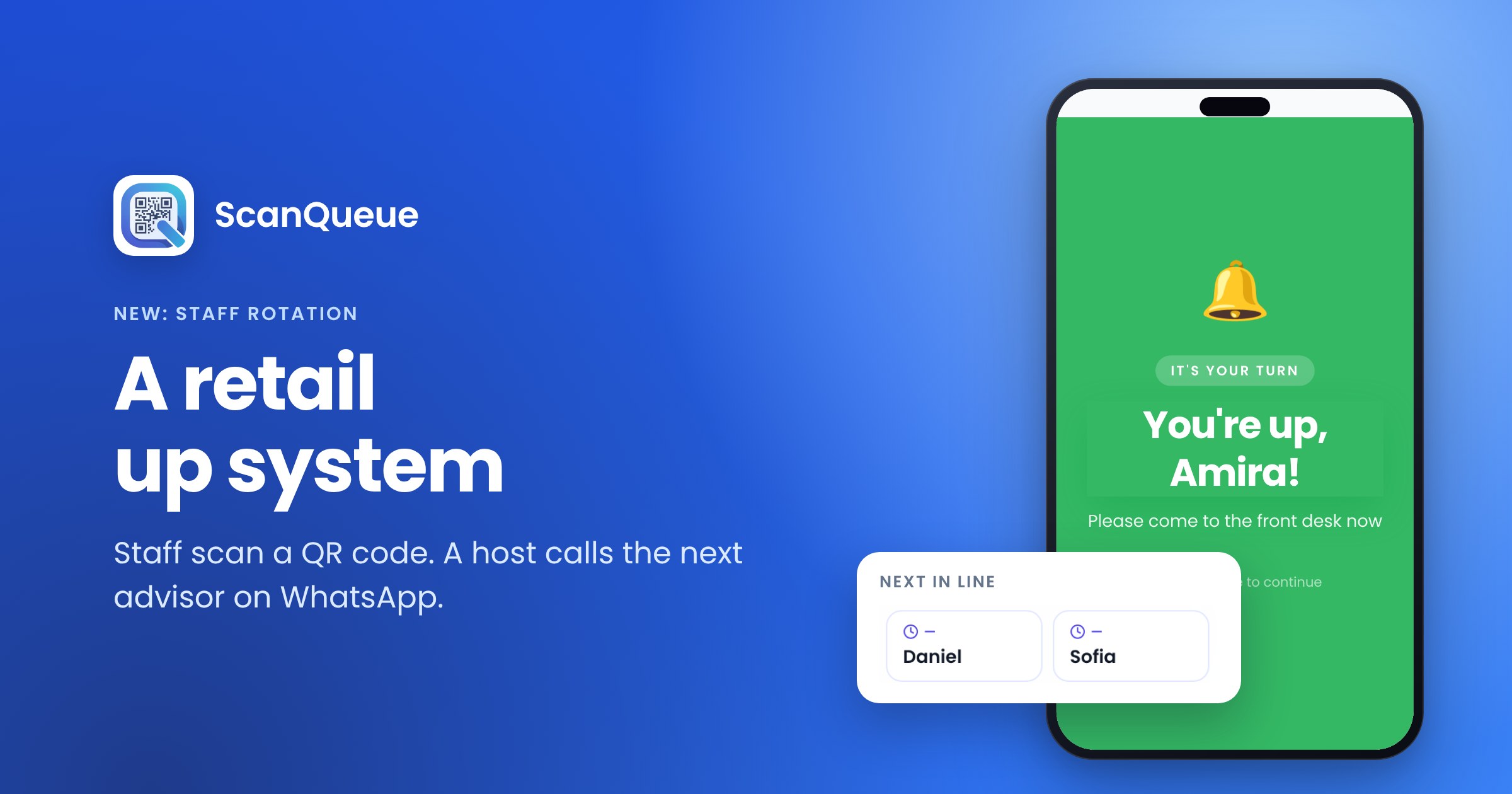
ScanQueue now has a retail up system, called Staff rotation in the product. Staff scan the shop's join QR once a day. A host calls the next advisor on WhatsApp, then that person goes back to the end of the line after each client. This is a sales-floor turn list, not HR shift rotation.
What a retail up system is
A retail up system, also called a sales up system, is the fair order a sales floor uses to decide who greets the next walk-in. The client is the "up". The advisor at the top of the list takes that up, then goes to the end of the line. Depending on the trade, people also call it an up rotation, a sales rotation, who's up, round robin or, in salons, a turn system.
Many stores still run it on a whiteboard, a clipboard or a sheet at the front desk. That works on a quiet morning. On a busy afternoon somebody forgets to move a name, two advisors both believe they are up, and the client at the door waits while it is sorted out. A sales floor up system has two jobs: keep the order, and tell the next person quickly.
What ScanQueue just added
On 29 November 2026, ScanQueue added a mode called Staff rotation. Turn it on, and the line on your queue screen holds your own team instead of your customers. Staff join with the shop's normal join QR code, a host calls the next advisor, and each person goes back to the end of the line after their client.
The name can mislead, so to be clear: this is not HR shift rotation, not a job-rotation programme, and not a staff roster or schedule. It is a turn list for the sales floor. It does not track sales either. It keeps the order, and it counts clients and minutes.
Staff rotation is on every plan, for venues that run a queue. It is not part of Live Capacity. An owner or manager opens Settings, then Queue Rules, and turns on Staff rotation, or presses Set up with AI, says that the people in the line are the shop's own staff, and taps Apply. The mode is also listed on our product updates page.
How it works: scan a QR, a host makes the call, then back to the end of the line
- Staff scan the shop's join QR once a day. Each advisor types a name and a mobile number on their own phone. There is no app to install, and they keep the same ticket all day. A WhatsApp message confirms they are in the staff line.
- A walk-in arrives, and the host taps Call Next. A host makes each call. Nothing is automatic.
- The next advisor is told on WhatsApp. Their ticket also shows that it is their turn.
- The host taps With a client. The advisor now shows as busy with a client, and the host can call the next person in line for the next walk-in.
- After the client, back to the end of the line. The advisor taps I'm free on their ticket, or the host taps Back in line. Either way they join the end, behind everyone who has been waiting.
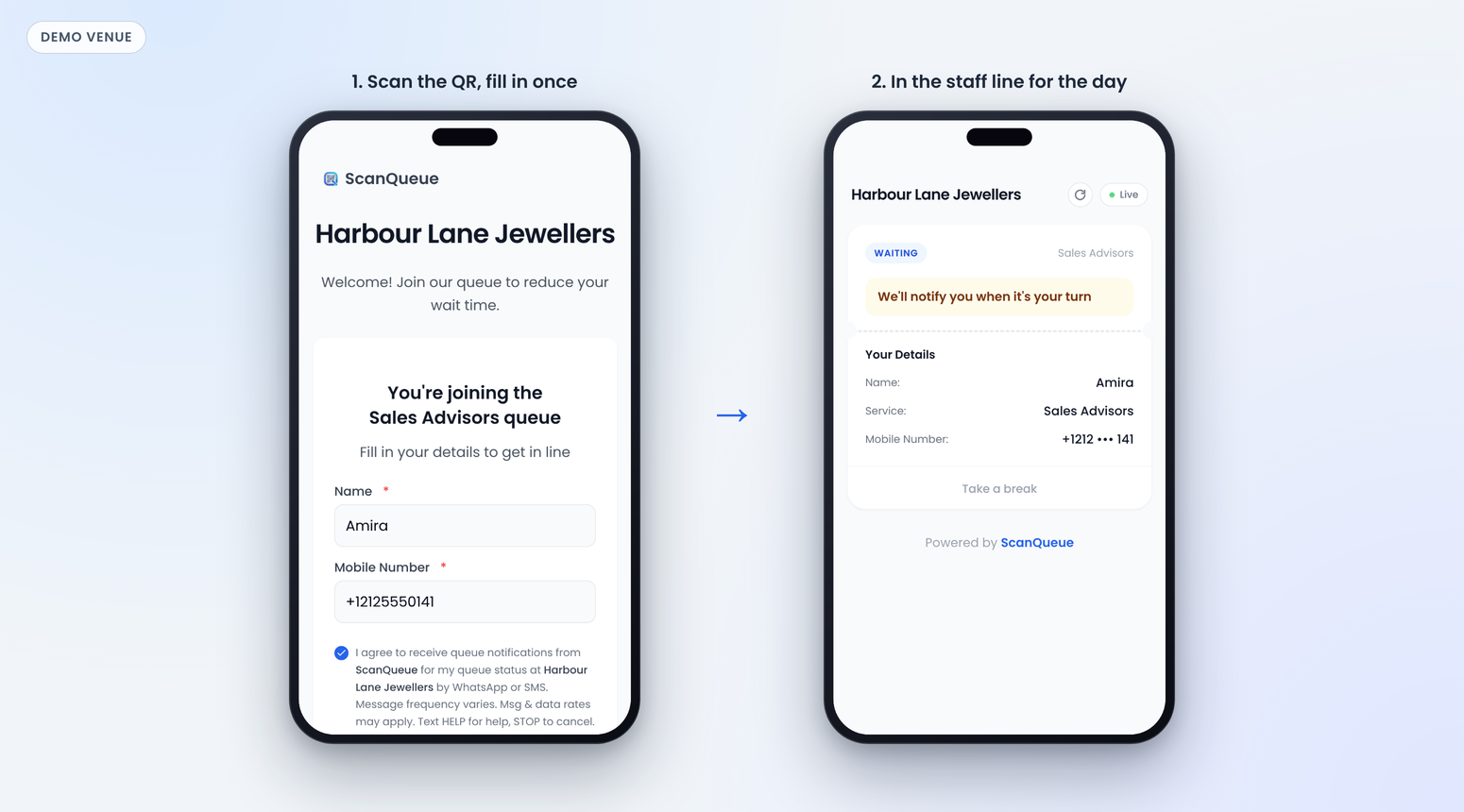
Joining the rotation on a demo venue. The shop and the names are made up.
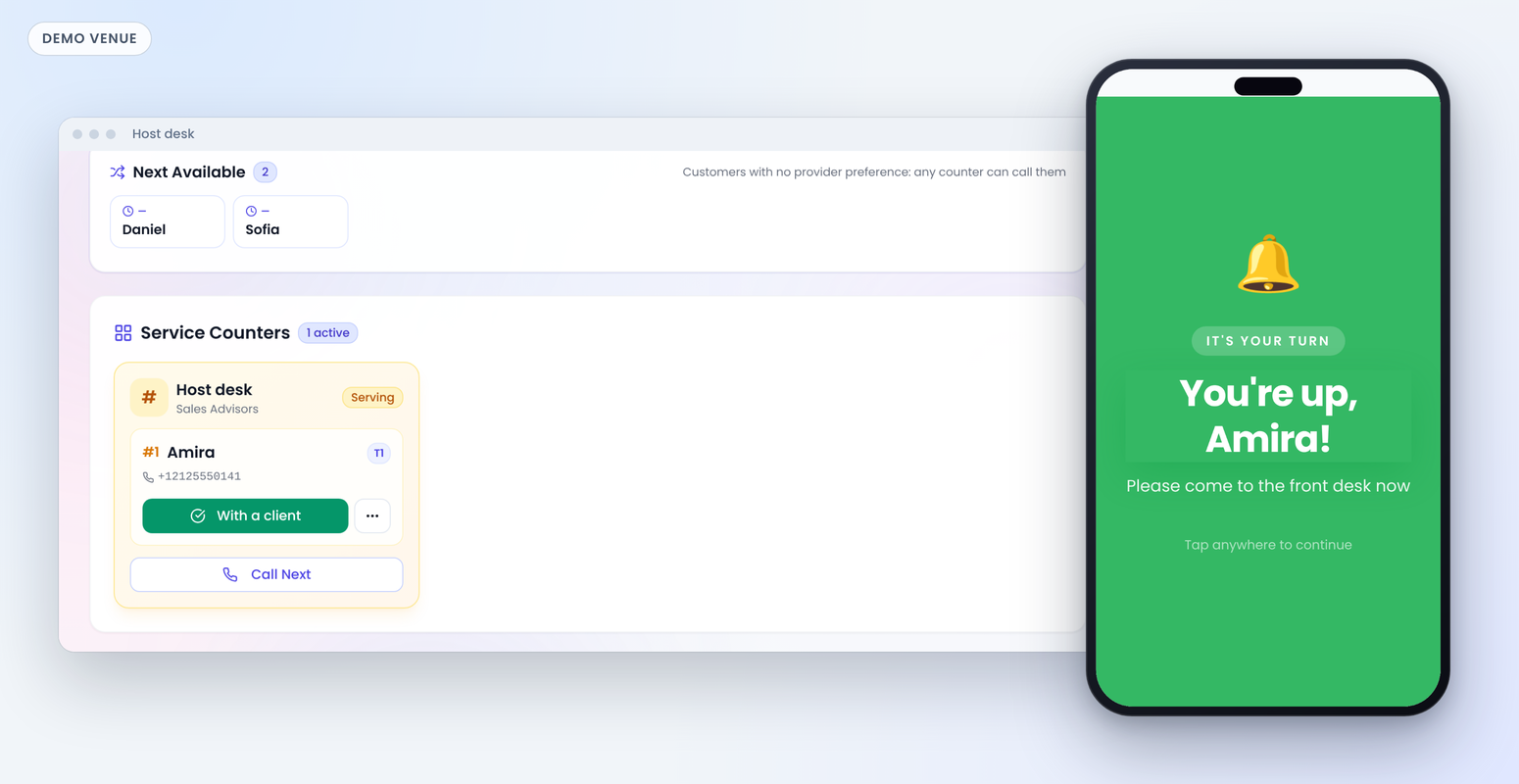
The host taps Call Next and the next advisor is told on their phone. Demo venue, made-up names.
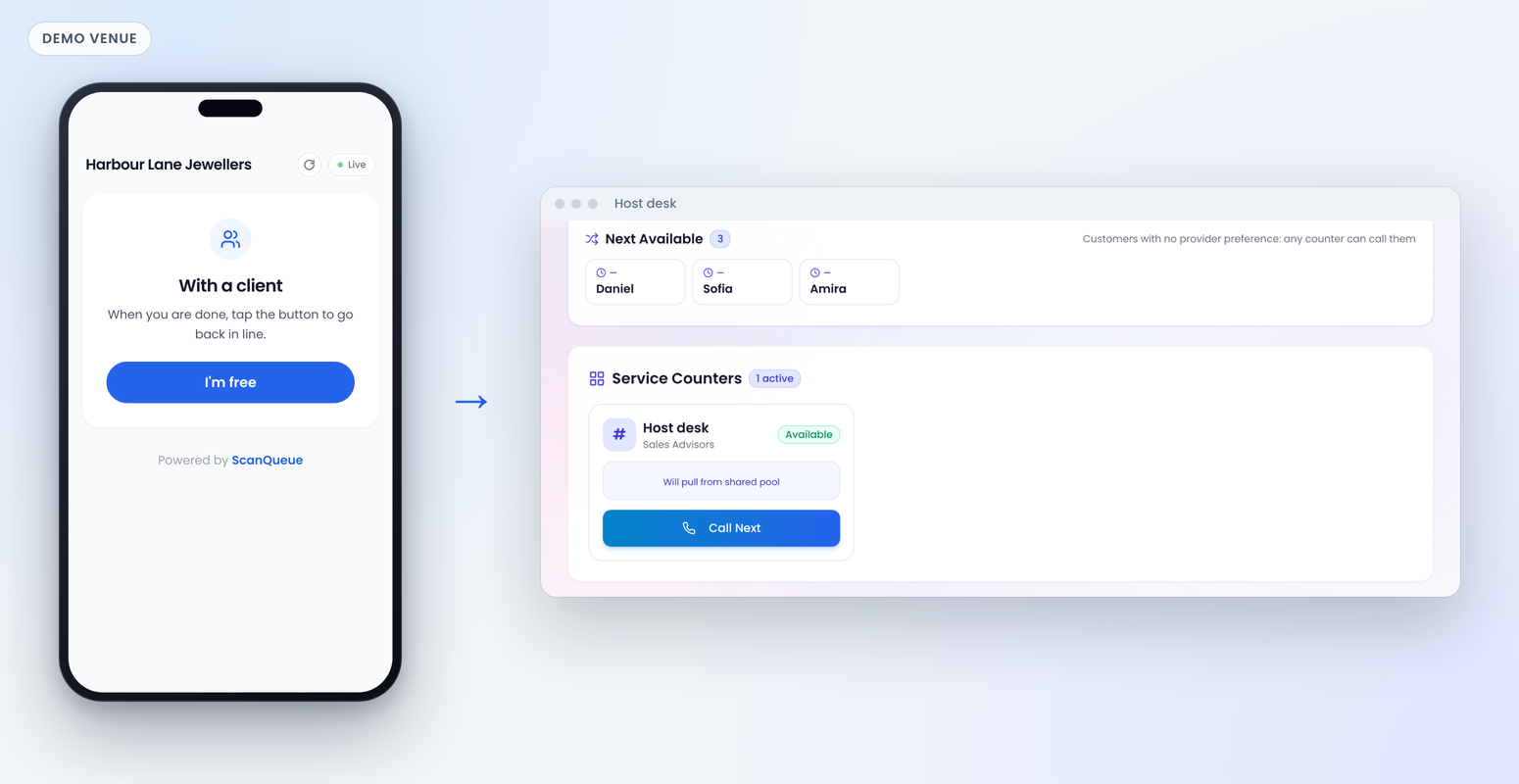
After the client, I'm free puts the advisor at the end of the line. Demo venue, made-up names.
A few details that matter on a real floor:
- A venue queues customers or staff, not both. Once Staff rotation is on, the line at that venue is your team.
- Busy afternoons. The host can call several advisors at once. People called at once, in the same Settings card, sets how many, from 1 to 20. At the limit, the web queue screen holds Call Next until one of them is with a client.
- Breaks. A person taps Take a break on their ticket and leaves the line. The host sees them under On a break. I'm back puts them at the end of the line.
- The report. Reports shows owners and managers a Staff rotation table: for each person, the clients they took, the average time with a client and the average wait in line. It counts clients and minutes, not sales.
- No scoreboard on the phone. Under What Customers See you can hide wait times and the place in line, so your team is not watching the numbers.
- Closing time. The line is not cleared overnight, so use Clear Queue at closing and let everyone scan again in the morning.
Who it is for in retail
Any store where clients walk in without an appointment and one advisor looks after one client at a time. The order matters most where advisors work on commission, because a skipped turn is a missed client. It also suits a floor where the team is spread out and nobody can see the list at the front desk.
ScanQueue already runs customer queues for stores, described on the retail queue management page. Staff rotation is the other side of the counter: the same QR code and the same queue screen, with your advisors in the line. The sections below go through the kinds of store we built it for.
Jewellery, bridal and other specialty counters
Take a made-up example, the demo venue in the screenshots above: Harbour Lane Jewellers, with four sales advisors and a host near the door. In the morning Amira, Daniel, Sofia and Lucas each scan the QR code. Later, with Lucas already serving, a new client walks in. The host taps Call Next and Amira's phone tells her she is up. She walks the client to a counter, the host taps With a client, and Daniel is now at the front of the line. When Amira is done she taps I'm free and joins the end, behind Daniel and Sofia.
Bridal boutiques, watch counters and other specialty floors work the same way: long consultations, one advisor per client, and a room where nobody wants a name called out loud. The call arrives on the advisor's phone, so the floor stays quiet.
Furniture, mattress, appliance and flooring stores
Big floors are where a paper up list struggles. Advisors are spread across the showroom or helping in the warehouse, and the list sits at a desk nobody is standing at. With an up system for sales associates on their phones, the call reaches the next person wherever they are, and the host does not have to walk the floor to find them.
These sales can take a long time. With a client keeps the advisor out of the line for as long as the client needs, and they come back at the end when they are done, not before.
Phone shops, electronics and opticians
Here the visits are shorter and several advisors are busy at the same moment. Set People called at once to two or three, and the host can send the next advisors to the door as clients arrive, without losing track of who went in which order.
If your customers are the ones who should wait their turn, for a repair desk or a fitting, that is a customer queue and not this mode. Choose per venue which one you need.
Car, boat and RV showrooms, and property offices
Showroom teams know the up system well: whoever is up takes the next visitor through the door. The host can be a receptionist or a floor manager with the queue screen open. Sales consultants scan in when they arrive, tap Take a break when they step out, and tap I'm back when they return.
Property offices can use the same list for walk-in enquiries at the front desk, so each enquiry goes to the next agent in turn.
For salons and barbers: the same idea as a turn system
In nail salons and barbershops the same list is called a turn system or a turn list: each walk-in goes to the next technician or barber in turn. Staff rotation can run it. The team scans the QR in the morning, the front desk taps Call Next for each walk-in, and the technician goes back to the end of the line after the client.
Remember that a venue queues customers or staff, not both. If your clients are the ones who queue for a chair, that is the customer queue described on our queue management for barbershops page. Staff rotation is for shops that would sooner line up the team.
WhatsApp messages and Start Free
Staff rotation sends two kinds of WhatsApp message: one when a person joins the staff line, and one when they are called. WhatsApp messages are included within the plan's monthly allowance. Each join and each call uses one message, so a busy floor uses the allowance faster than a quiet one. The allowance for each plan is on the pricing page, and the countries where ScanQueue messages by WhatsApp only are listed on the SMS credits by country page.
A host makes each call, and the ticket on the advisor's phone shows the turn as well. To try it, Start Free, open Settings, then Queue Rules, and turn on Staff rotation.
Run your up system from one queue screen
Start Free, turn on Staff rotation in Settings, and have your team scan the join QR.
Frequently Asked Questions
What is a retail up system?
A retail up system is a fair order for who greets the next walk-in. The client is the "up." The advisor at the top of the list takes that up, then goes to the end of the line.
Does ScanQueue call the next advisor automatically?
No. A host taps Call Next for each call, and ScanQueue sends that advisor a WhatsApp message.
Is this the same as staff rotation in HR?
No. This is a sales-floor or salon turn list, not a shift roster or job-rotation programme.
Does it work in a salon or barbershop too?
Yes. The same mode can run a turn system or turn list for technicians and barbers.
Do WhatsApp messages cost extra?
WhatsApp messages are included within the plan's monthly allowance.
Run a store? See our retail queue management.
Stop losing walk-ins to wait times
Set up ScanQueue in 5 minutes. Customers scan a QR code, wait anywhere, and get a WhatsApp or SMS message when it's their turn.
- Free plan, no credit card
- No app download for customers
- WhatsApp alerts with QR code check-in
Fernando Mendes
Founder, ScanQueue
Helping businesses reduce wait times and improve customer experience with smart queue management solutions.